

Thinfinity Workspace Features
Connectivity
Desktops and Applications (Windows, Linux and Console)
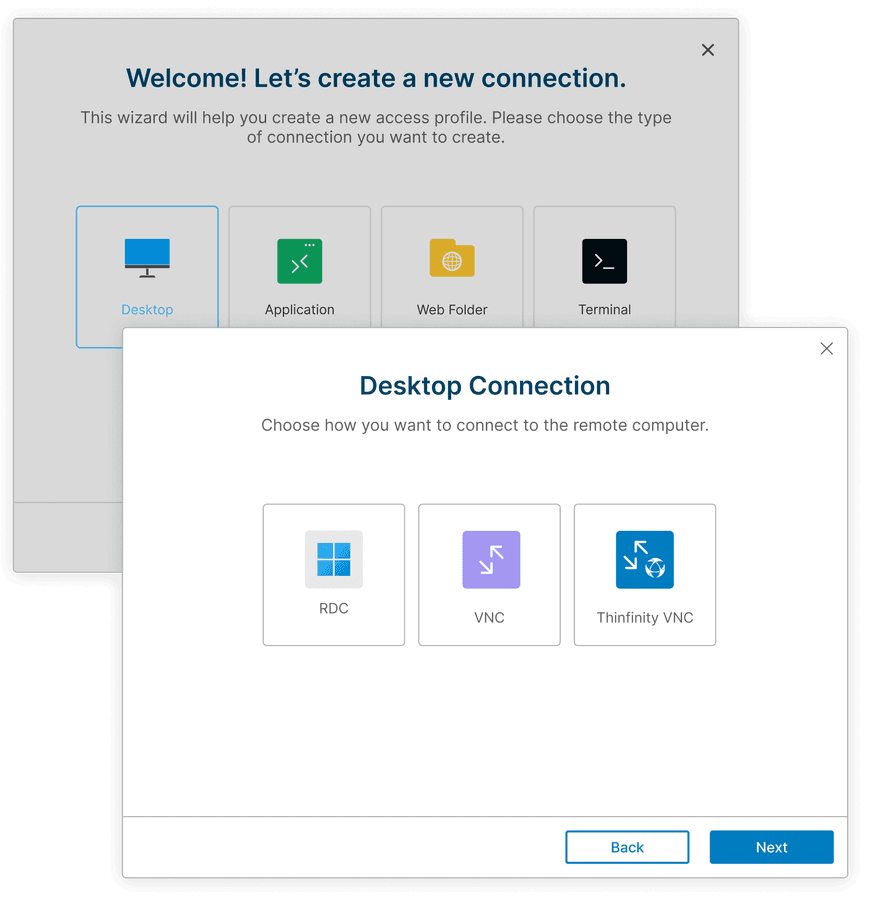
Remote Desktop Connection (RDC)
RDC is Cybele's proprietary remote desktop protocol, built for hosts you can't expose to inbound traffic. A lightweight agent on the host machine opens a reverse connection outbound to Thinfinity Workspace over an SSL/TLS 1.3 encrypted WebSocket tunnel — so the host never needs a public IP, an inbound port, or a firewall change. It works behind NAT, on isolated network segments, and on cloud VMs with every ingress rule closed.
Sessions run as full desktops or as RemoteApp, delivering a single application without exposing the underlying desktop, and reach users through an HTML5 browser or the native Windows, Linux, iOS, and Android clients — same encrypted tunnel, same policy enforcement, whichever the user picks. RDC carries bi-directional audio, file sharing, and device redirection, and holds up under graphic-intensive workloads like CAD, 3D modeling, and video editing.
How to configureRDP (Remote Desktop Protocol)
Developed by Microsoft, RDP is a secure protocol that facilitates remote desktop connections to Windows systems. It uses SSL/TLS encryption to protect communication, making it a top choice for IT support, remote work, and collaboration.
In Thinfinity Workspace, RDP connections are established through a reverse gateway, allowing access via public or private IPs through a secure SSL tunnel, without requiring open inbound ports. This improves security and simplifies deployment.
RDP supports full desktop access and RemoteApp, letting users run specific applications remotely without accessing the full desktop, making it ideal for secure, high-performance remote desktop solutions for troubleshooting, remote management, and application delivery.
Knowledge Base articleVNC (Virtual Network Computing)
Thinfinity Workspace delivers any RFB-compliant VNC server — RealVNC, TightVNC, UltraVNC, TigerVNC, x11vnc, macOS Screen Sharing — to an HTML5 browser or the native Windows, Linux, iOS, and Android clients, with no changes to the VNC server you already run.
A lightweight agent on the host reaches the VNC server on localhost and opens a reverse connection outbound to Workspace over an SSL/TLS 1.3 tunnel. Port 5900 never leaves the machine: no public IP, no inbound port, no firewall exception, and the VNC server is never exposed to the network. Where the host is already reachable, Workspace connects through the gateway instead — the agent is for the hosts you can't or won't open.
Because VNC attaches to the physical display rather than spawning a new session, you see exactly what's on the console — the same screen as the person standing in front of the machine. That's why it remains the protocol of record for IP-KVMs, industrial HMIs, Linux workstations, and lab equipment, where the question is what the machine is actually doing.
Knowledge Base articlexrdp (Linux Desktops over RDP)
Thinfinity Workspace connects to Linux hosts running xrdp — the open-source RDP server — and delivers full Linux desktops to an HTML5 browser or the native Windows, Linux, iOS, and Android clients. An agent on the host reaches xrdp on localhost and opens a reverse connection outbound to Workspace over an SSL/TLS 1.3 tunnel, so port 3389 never leaves the machine: no public IP, no inbound port, no firewall exception.
Because xrdp spawns a session per user rather than attaching to the console, one Linux host serves many users at once, each with their own desktop — XFCE, GNOME, KDE, MATE — and sessions survive a disconnect, so a dropped connection resumes where the user left off instead of starting over. The RDP feature set comes with it: clipboard redirection, drive redirection, audio, and printing. On AD-joined hosts, xrdp authenticates through PAM against the same directory as the rest of Workspace, so Linux desktops inherit the RBAC, MFA, and access-hour policy you already run.
That makes Linux VDI a line item rather than a project. xrdp is open source and carries no per-seat license, and Workspace publishes it through the same gateway, the same portal, and the same audit trail as your Windows desktops — one platform for a mixed estate, rather than a separate Linux VDI product to buy, run, and renew.
SSH (Secure Shell) and Console Access
Thinfinity Workspace brokers SSH to Linux, Windows, and macOS hosts, network devices, and appliances over TLS 1.3, rendered in an HTML5 terminal or the native Windows, Linux, iOS, and Android clients — no key material on the endpoint, whichever you use. For hosts in closed segments, an agent opens a reverse connection outbound, so the target needs no inbound port.
Brokering is what makes SSH governable. Credentials stay in your control, rather than scattered across engineer laptops and ~/.ssh directories; access runs through the same RBAC, MFA, and access-hour policy as every other resource in Workspace.
Knowledge Base articleThinfinity VNC
Thinfinity VNC is Cybele's proprietary screen-sharing protocol for Windows hosts, built for browser delivery. A server component on the host opens a reverse connection outbound to Workspace over a TLS 1.3 encrypted socket tunnel — no public or private IP, no inbound port, no exposure to the internet.
It delivers a full Windows desktop or a single application. Sharing one application rather than the whole desktop keeps the rest of the machine out of view and cuts the pixels on the wire, which matters on constrained links and for graphic-intensive work — CAD, imaging, engineering tooling — where standard VNC encodings struggle.
Unlike third-party VNC servers, it's managed from the same console as every other resource in Workspace: one RBAC model, one MFA policy, one audit trail, deployed and updated centrally instead of per-machine.
Thinfinity VNC or VNC? Use Thinfinity VNC on Windows hosts, where it's fastest and centrally managed. Use standard VNC for Linux, macOS, IP-KVMs, HMIs, and any existing VNC estate you want to bring under Zero Trust access without replacing.
Thinfinity VirtualUI
VirtualUI is Cybele's development platform: developers reference a proprietary DLL in a Windows desktop application they own the source to, and the application's existing GDI and GDI+ rendering is redirected to an HTML5 browser — no UI rewrite, no port to a web framework. The application stays a Windows binary on a Windows host; what changes is its surface.
Once integrated, it publishes through Thinfinity Workspace as a first-class resource — and it doesn't get a bespoke security model, it inherits the platform's. Authentication through your IdP, MFA, RBAC scoped to the individual application, an SSL/TLS 1.3 reverse tunnel with no inbound ports on the host, audit logs forwarded to your SIEM, user analytics, and session recording. That's access control an ISV would otherwise build and maintain itself.
Cloud Manager orchestrates what runs underneath, provisioning and scaling the Windows hosts serving your VirtualUI applications with demand rather than sizing for peak and paying for idle. A single application serves many concurrent users from one host, each with an isolated instance.
VirtualUI or RemoteApp? Use RemoteApp to deliver a Windows application you can't or won't modify. Use VirtualUI when you own the source and want the application itself to become a web application.
Full details on Thinfinity VirtualUI
Web Applications, Intranet and SaaS
Web Application Gateway (WAG)
WAG publishes internal web and intranet applications to remote users without putting those applications on the internet. An agent inside the network opens a reverse connection outbound to Thinfinity Workspace, which terminates TLS 1.3 and proxies each request inward — so the application server needs no public DNS record, no inbound ports.
Every request is authorized before it reaches the application. Users authenticate through your IdP, satisfy MFA, and receive the specific applications their role permits — not a network segment. A contractor who needs one internal tool gets that tool and no route to anything else, and every session is logged and forwarded to your SIEM.
That distinction is what makes WAG a practical alternative to VPN and traditional ADC publishing: for third-party and contractor access, for internal apps that were never designed to face the internet, and for teams consolidating perimeter appliances they no longer want to maintain.
WAG or Web Link? Use WAG to publish applications you host. Use Web Link to govern access to SaaS you don't.
Web Link
Web Link brings the SaaS applications and websites your organization depends on behind the same front door as everything else in Workspace. Users authenticate once to Workspace, satisfy MFA, and land in one portal holding their desktops, internal applications, and SaaS — instead of a governed portal for some resources and an ungoverned bookmark folder for the rest.
RBAC governs what appears there. Role changes propagate to the portal, offboarding cuts access from one place rather than a spreadsheet of services, and every launch is logged and forwarded to your SIEM — a record of who reached which service, and when.
Where a provider supports SAML 2.0 or OAuth 2.0, Workspace federates the sign-in — so users reach the application without a separate credential to manage, and you keep one authoritative place to revoke it.
Legacy Host Mainframe, AS400, VT
3270/5250 Emulations
Thinfinity delivers 3270 and 5250 terminal access the way it delivers any other resource. A Thinfinity agent runs z/Scope — Cybele's own terminal emulator — inside your network, in a Linux or Windows container or on a Linux or Windows VM, and Workspace delivers the session to an HTML5 browser or the native Windows, Linux, iOS, and Android clients.
TLS 1.3 covers the whole path: user to Workspace, and z/Scope to the mainframe over TN3270 and TN5250. The mainframe never faces the internet — z/Scope reaches it from its own segment, and the host needs no inbound port. Nothing is installed on endpoints: no per-desktop emulator, no version drift across thousands of seats, no reinstall when someone gets a new laptop.
Because the emulator is z/Scope, users get the real thing rather than a web approximation. Keyboard mapping and macros carry over, so the muscle memory and automation built up over years survives the move to the browser.
Mainframe access then inherits Workspace's identity model: RBAC scoped per user, MFA at the front door, access hours, and audit logs forwarded to your SIEM — in front of systems whose native authentication predates all of it. For regulated industries running zSeries and iSeries, that's the gap this closes.
How to publishWeb Folders
WebDav
Web Folders publish internal file shares — network drives, departmental shares, home directories — to remote users without exposing the file server. An agent inside the network reaches the share and opens a reverse connection outbound to Workspace, so the server needs no public IP, no inbound port, and no VPN in front of it. Users browse, upload, download, and edit through an HTML5 browser or the native Windows, Linux, iOS, and Android clients.
Access follows the same identity model as everything else in Workspace: authentication through your IdP, MFA, RBAC scoped per share, access hours, and audit logs forwarded to your SIEM. File locking means two people editing the same document don't silently overwrite each other. Nothing is copied to a third-party cloud, and nothing needs a client install to reach.
That makes it the governed answer to a common gap: contractors who need one folder rather than a network, staff on unmanaged devices, and everyone who otherwise emails a spreadsheet to a personal account because reaching the share was too hard.
Web Folders or drive redirection? Use drive redirection to move files in and out of a live session. Use Web Folders when the files are the point — no desktop, no session, just the share.
Knowledge Base articleRole-Based Access Control (RBAC)
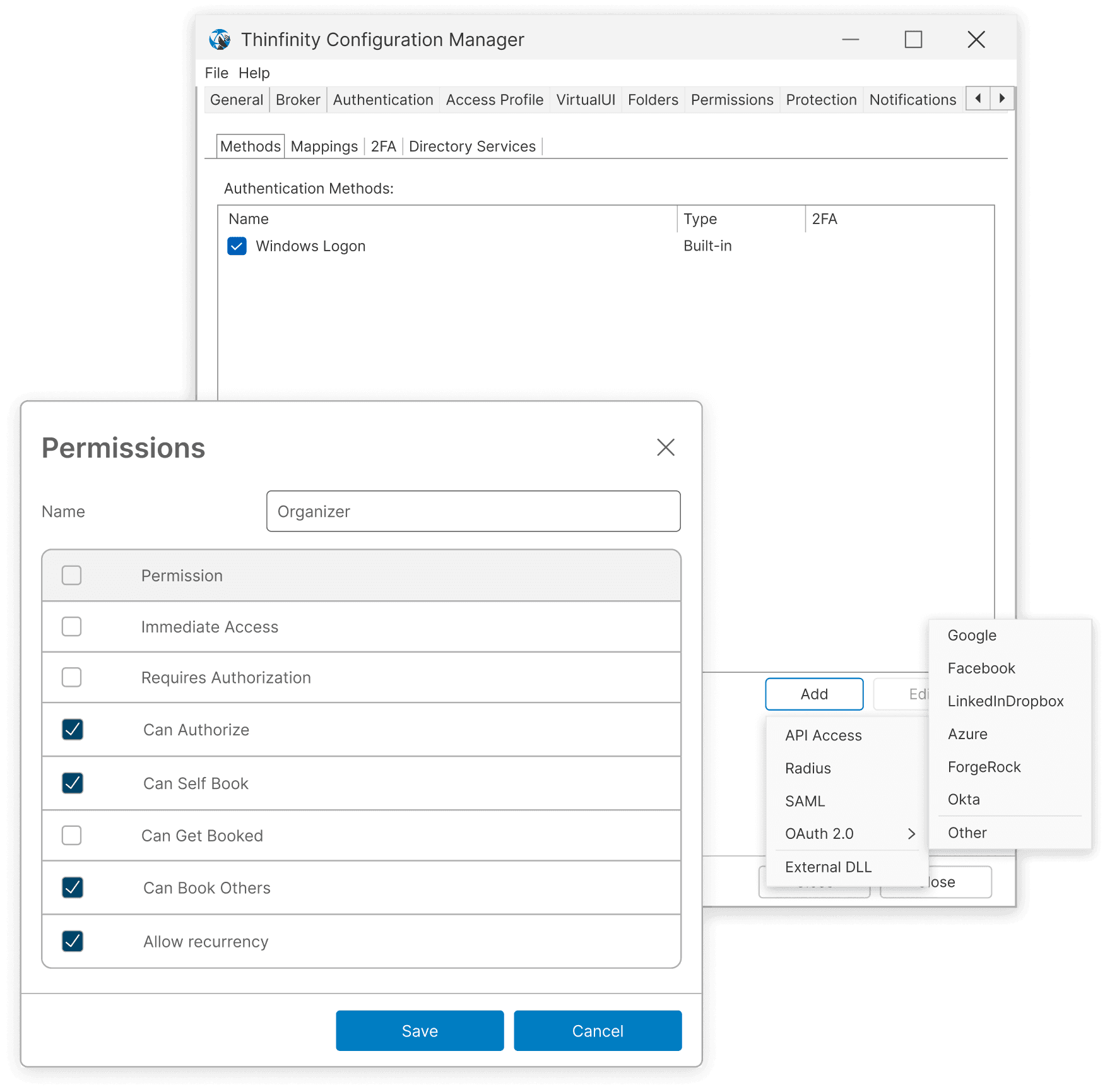
Thinfinity implements RBAC to manage roles and permissions based on user identity, allowing organizations to control access to applications, files, and desktops according to user roles. This enhances security management by ensuring users have only the necessary access, streamlining compliance efforts.
With RBAC, Thinfinity simplifies access control across diverse environments, improving security and reducing administrative overhead. By aligning user access with defined roles, organizations can effectively manage permissions, meet compliance standards, and secure sensitive resources.
Read the guideIdentity Providers (IdP)
Thinfinity authenticates against the identity provider you already run — Microsoft Entra ID, Okta, OneLogin, Google Workspace, AD FS, Ping Identity, or self-hosted open-source providers like Keycloak — over SAML 2.0, OAuth 2.0 and OpenID Connect. Users sign in where they already sign in. Workspace doesn't become another credential to issue or another directory to deprovision.
Your IdP's controls carry through rather than being worked around: MFA and conditional access are enforced at sign-in, and group and claim mappings drive Thinfinity RBAC — so a change to a user's group membership changes what they can reach in Workspace, with no second administrative step and no separate offboarding.
Where there's no external IdP — smaller deployments, air-gapped networks, OT segments — Thinfinity's built-in identity provider handles authentication natively, with 2FA and MFA through its own HOTP/TOTP server and Google or Microsoft Authenticator. Nothing external required.
RADIUS covers the rest: legacy authentication systems and MFA appliances that predate SAML and OIDC.
Directory Services
Thinfinity authenticates directly against Active Directory, LDAP directories, and workgroup or local accounts — and against several at once. One Workspace deployment can serve multiple directory sources simultaneously, each with its own resources, RBAC policy, and branding: an MSP serving distinct customers from a single deployment, two companies mid-merger, or a business unit that kept its own directory.
Cross-forest authentication extends that across AD trust relationships, so users in different forests reach what they're entitled to without a parallel identity estate to maintain alongside it.
An AD cache sits in front of the directory. Authentication and group lookups are served from cache instead of round-tripping to a domain controller every time, cutting logon latency and taking sustained load off the DCs — which is the difference between usable and painful once you're enumerating groups for thousands of users.
Multi-Factor Authentication (MFA)
Thinfinity can enforce multi-factor authentication at two points: when a user signs in to the platform, and again when they reach a specific resource.
At the platform level, sign-in happens where your identity already lives. Entra ID, Okta, Keycloak — the provider's MFA and conditional access policies are enforced there, so users are challenged once by the system that already owns the decision rather than twice by two that both want to.
At the resource level, MFA gets granular. A second factor can be required for an individual connection rather than only at the front door — so a production jump host, a mainframe session, or a privileged application demands re-verification while a low-risk internal tool doesn't. Duo integrates over RADIUS to serve that challenge, bringing push approvals and device trust to the moment access actually happens.
Configuring MFABuilt-In TOTP Server
Where there's no external IdP or MFA platform, Thinfinity enforces MFA itself. A built-in TOTP server issues standard time-based one-time passcodes that work with any authenticator app — Microsoft Authenticator, Google Authenticator, Authy, 1Password — with no external service to subscribe to and no per-user MFA license.
Nothing has to reach the internet for it to work, which is what makes it viable where cloud MFA isn't: OT segments, air-gapped networks, and any deployment that can't take a dependency on a third-party service staying reachable. Enrollment and enforcement happen in the same console as the rest of Workspace.
TOTP SettingsConditional Access and Group Policy Integration
Every access decision in Workspace combines two inputs: who the user is, and the conditions under which they're asking.
Group membership answers the first. Workspace reads Active Directory groups directly, so a user's role — and the resources that role carries — follows their membership. Add someone to a group and the resources appear; remove them and access is gone. There's no parallel entitlement list to reconcile, and no second offboarding step to forget.
Policy answers the second. Conditions evaluate where a request comes from, what device it's on, and when it arrives — and they apply per resource, not only at the front door. The same account can reach a low-risk internal tool from anywhere and a production jump host only from a corporate network during business hours.
Both are evaluated on every request. That's the division of labor: Active Directory remains the source of truth for identity, and Workspace enforces the conditions AD was never designed to express.
Read the guideAccess Hours & Restrictions
An administrator defines when a user or group may reach a specific application — scoped per resource, in calendar days and hours. Requests outside that window are refused.
The window governs the session, not just the login. Once connected, the user sees a countdown of the time remaining; at zero, the session closes automatically. That's what makes it a control rather than a schedule: access doesn't outlive its window because someone signed in a minute before the cutoff, and nobody has to remember to revoke anything. The countdown does quiet work too — a user who can see the clock plans around it instead of losing work to it.
That's how time-boxed access should work. A contractor gets the maintenance window and nothing outside it. A vendor gets Tuesday afternoons. An offshore team gets its shift. Standing access — the entitlement that accumulates quietly across every access system — stops being the default.
Customization optionsSecurity & Monitoring
Audit Logging
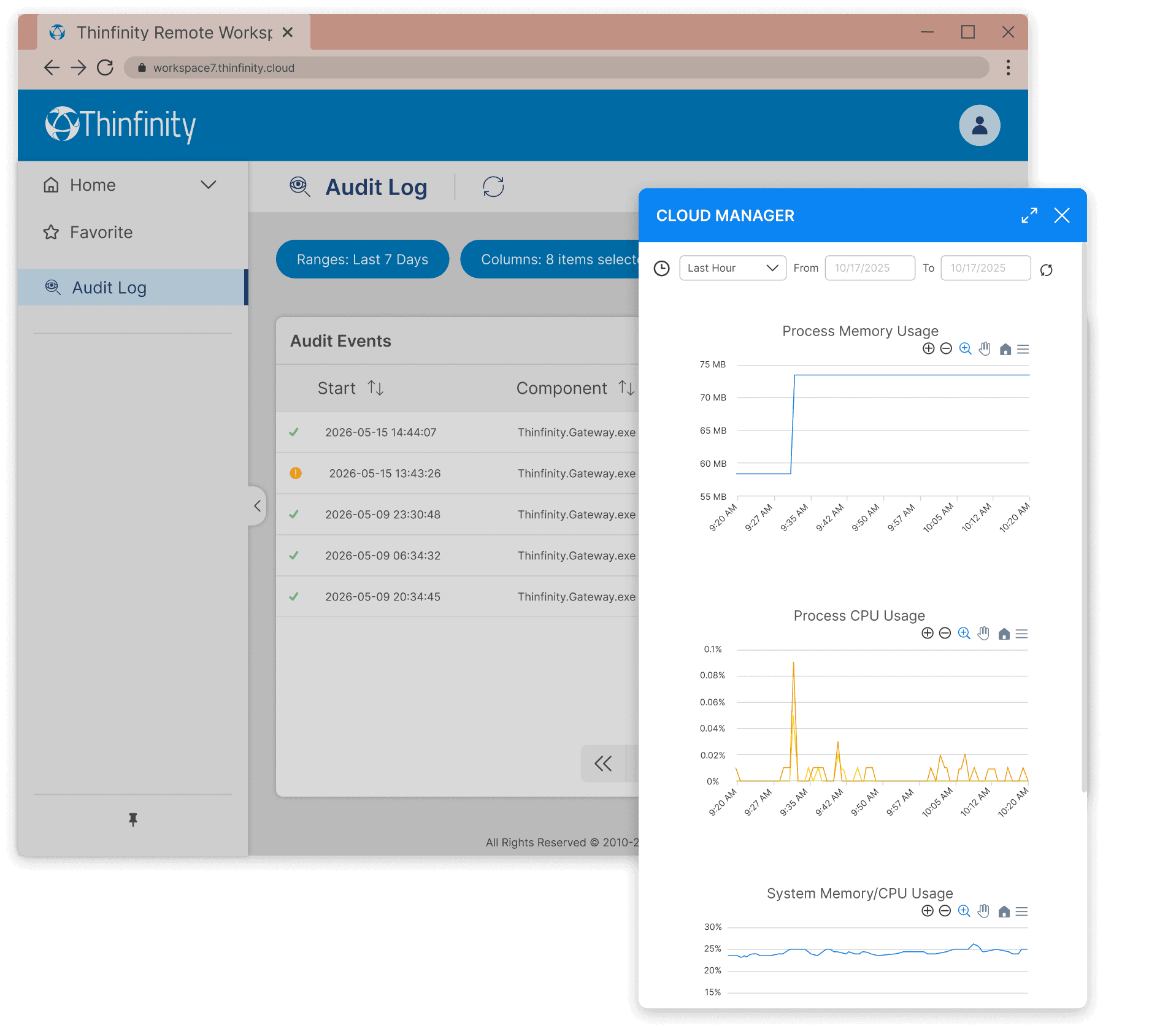
Workspace records authentication attempts, session starts and stops, the resources reached, and administrative changes to policy and configuration. Each entry carries the user, the resource, the source address, and the timestamp.
Logs forward to your SIEM rather than sitting in a console someone has to remember to open. Thinfinity events correlate against the rest of your infrastructure, and retention, alerting, and reporting stay where your compliance program already runs — the record an auditor asks for under SOC 2, PCI-DSS, or HIPAA, held in the system that already holds everything else.
User Analytics
User Analytics reports on how a deployment is actually used: session duration, access times, login patterns, and which resources are reached and how often, across both remote and local users.
It runs on the same activity record as audit logging, asked a different question — the evidence behind sizing decisions that otherwise get made on instinct. How many concurrent sessions to provision for, which licenses are assigned to people who never sign in, which published resource nobody has opened since it went live.
Infrastructure Monitoring
Workspace instruments each layer of the platform — gateways, brokers, and VDI host infrastructure — and stores the collected metrics in a VictoriaMetrics time-series backend.
Every component reports hardware consumption (CPU, memory, disk) and the performance of the services running on it. Collection extends to the final host where the session executes, so metrics resolve per layer instead of aggregating at the platform edge.
Time-series retention exposes utilization and capacity across arbitrary ranges: per-component load over time, pool headroom against observed peaks, and service degradation ahead of failure.
Monitoring ManualSession Recording
Thinfinity provides powerful session recording capabilities, allowing administrators to capture and review user sessions for security, compliance, and training purposes. This feature records all user interactions during remote sessions, offering a complete audit trail of activity, including keystrokes, mouse movements, and screen changes.
Administrators can access these recordings to investigate suspicious activity, ensure adherence to security policies, and provide training for new users. Recorded sessions can be stored securely and played back for analysis, enabling real-time monitoring or post-session reviews to enhance operational oversight.
Session Recording ManualSession Management
Thinfinity offers advanced session management features that allow administrators to monitor, restrict, or terminate sessions for both remote and local users. This capability is essential for maintaining control over access to corporate resources, ensuring security policy compliance, and safeguarding sensitive data.
Administrators can oversee real-time user activity, enforce session timeouts, or impose restrictions based on user roles, whether the session is initiated locally or remotely. Thinfinity's session management tools provide granular control, enabling IT teams to quickly intervene in cases of unauthorized access or policy violations, ensuring robust remote access security for both environments.
Allow and Deny IP List
Thinfinity provides Allow and Deny IP list management to enhance security by controlling which IP addresses can access the platform. Administrators can define specific IP addresses or ranges that are permitted or blocked, ensuring that only trusted sources can connect to resources. This feature helps prevent unauthorized access and restricts remote access to designated networks, adding a crucial layer of protection.
By combining IP filtering with other security measures like Conditional Access, Thinfinity ensures comprehensive control over network security for both local and remote sessions.
Brute-force Detection
Thinfinity incorporates brute-force detection to automatically identify and block repeated unauthorized login attempts. By monitoring login patterns and identifying suspicious activity, Thinfinity can detect potential brute-force attacks and take action by temporarily blocking IP addresses.
This feature helps protect user accounts and sensitive resources from brute-force hacking attempts, ensuring stronger account security and reducing the risk of unauthorized access.
User Experience
Multi-Monitor
Thinfinity enables seamless management of multiple monitors, allowing users to work across several screens as if they were a single interface. This feature boosts productivity by minimizing the need to switch between applications and monitors. It is supported without client installation, providing easy access and functionality through a web browser, ensuring a streamlined user experience for both local and remote environments.
Enabling Multi-MonitorClipboard Redirection
Thinfinity enables seamless clipboard redirection, allowing users to transfer files and data between local and remote machines using the clipboard. This functionality provides a smooth user experience, supporting bidirectional transfer of text, rich text, images, and files. Clipboard file transfer is critical for enhancing remote desktop productivity, as it simplifies file sharing without requiring additional steps like drive redirection or email attachments.
This feature is supported across multiple platforms, providing real-time synchronization between local and remote sessions, ensuring that clipboard data is securely transferred without the need for client-side software installation.
Multitouch Redirection on iOS
Thinfinity supports multitouch redirection on iOS devices, allowing users to interact with remote desktops using multitouch gestures like zoom, swipe, and pinch directly from their iPhones or iPads. This feature works seamlessly in both client-based and clientless environments, providing full multi touch functionality without needing additional software.
Clientless users can enjoy multitouch through an HTML5 browser, while client-based users can interact with remote session using the Thinfinity Native IOS application.
Session Sharing
Thinfinity allows users to easily share their remote sessions with others, such as IT admins or colleagues, by generating a one-time session URL and password. This link and password will expire once the session ends, ensuring security while simplifying tech support and collaboration without needing third-party software. It provides a seamless way to troubleshoot or collaborate in real-time, allowing multiple users to view or control the same session remotely.
Session sharing eliminates the need for external tools, making support and collaboration efficient and secure.
Bidirectional Audio and Video (RTAV)
Thinfinity supports Real-Time Audio and Video (RTAV) redirection, allowing seamless use of microphones and webcams from the local machine in remote sessions. Users can conduct audio and video conferencing within virtual desktops without leaving the VDI environment. This feature works with both client-based and clientless setups, enabling efficient remote access to real-time applications such as Skype, Teams, and Zoom.
RTAV is designed to consume minimal bandwidth, providing high-quality streaming while minimizing latency, allowing businesses to maintain productivity during video meetings in remote or virtualized environments. It supports multiple devices, and users can select their preferred audio and video input from the remote session.
GPU Optimization
Thinfinity supports GPU-accelerated performance for both client-based and clientless setups, optimizing graphic-intensive applications like 3D modeling, video editing, and engineering simulations. By utilizing technologies like H.264 for video compression and GPU offloading, Thinfinity ensures high-quality streaming and low-latency performance, even in remote virtual desktop environments.
Clientless users can benefit from enhanced graphics without installing additional software, while client-based users experience maximum performance for demanding workloads. This makes Thinfinity ideal for enterprises running VDI environments that require smooth, high-performance access to resource-intensive applications.
Device and Peripheral Integration
Printing Redirection
Thinfinity supports clientless printing as well as agent-based printing from remote machines to local printers. Users can redirect print jobs seamlessly to any local or network printer, ensuring a smooth workflow in both VDI and session-based environments. With clientless printing, there's no need to install local drivers, as printing is handled entirely through a web browser. Thinfinity also supports agent-based printing, which allows for direct, high-performance printing with additional control over print settings such as paper type and tray usage.
In addition, network printing mapping is available, allowing users to connect to network printers as if they were local, enhancing flexibility for organizations with distributed infrastructures. Whether printing directly to POS printers, Label printers or network-based devices, Thinfinity ensures secure and efficient print redirection with minimal setup.
Redirecting devicesDrag & Drop File Transfer and Direct File Transfer
Thinfinity supports drag-and-drop file transfers between local and remote machines, allowing users to easily share files in real-time. This functionality is complemented by direct file transfer, which enables fast, secure file transfers between virtual environments and host machines without needing third-party applications.
For added flexibility, Thinfinity offers access to local drives through both clientless and client-based solutions. This means users can access and transfer files from their local machines to remote sessions without installing additional software, or they can map local drives directly to the remote session for continuous access during the session.
This multi-method approach ensures seamless file sharing in VDI and session-based environments, improving user experience while maintaining security and compliance with enterprise standards.
USB Redirection
Thinfinity redirects USB devices attached to the client machine into the remote session, in both VDI and session-based deployments. The agent presents the device to the remote host at the device level, so the host's own vendor drivers bind to it as though it were locally attached — mass storage, scanners, and other standard peripherals included.
Device-level redirection is what low-level peripherals require. Fingerprint readers, PIN pads, signature pads, and CCID smart card readers are timing-sensitive and driver-dependent: they need the physical device presented to the driver stack, not an abstraction of it. These are the peripherals banking, government, and healthcare deployments are built around.
Clientless redirection through the browser is bounded by what the browser exposes. Devices already claimed by an OS kernel driver — HID and CCID classes among them — cannot be redirected this way, which excludes fingerprint readers, PIN pads, and smart card readers. Those require the native client.
Network-attached USB devices are mapped into the session by the same mechanism, without being physically connected to the client machine.
Redirecting devicesCross-Platform Access
Pure HTML5
Any HTML5-compliant browser connects to Workspace with no installed client. The endpoint operating system is not a factor: Windows, macOS, Linux, ChromeOS, iOS, and Android reach the same sessions through the browser.
The browser session is not a reduced one. Multi-monitor, printer redirection, clipboard, drag-and-drop file transfer, GPU-accelerated rendering, and bidirectional audio and video redirection all operate in HTML5 — collaboration tools running inside the session use the local microphone and camera directly.
Windows & Linux Clients
The native Windows client connects through the same gateway as the browser, over the same outbound reverse connection and the same TLS 1.3 tunnel. No inbound port is opened on the host, and sessions are subject to the same RBAC, MFA, access hours, and audit policy. The delivery mode changes; the security path does not.
Two cases call for it. On managed endpoints — corporate desktops and Windows-based thin clients — the client is deployed, configured, and policy-controlled centrally, matching the operational model those fleets already run. And for device-level USB redirection, the client presents peripherals to the remote host at the driver level, which is what fingerprint readers, PIN pads, signature pads, and CCID smart card readers require.
Session capability matches the industry benchmark (AVD, Citrix), including multi-monitor with dynamic resolution and DPI scaling, redirection of printers, drives, clipboard, cameras, microphones, audio, and smart cards, multimedia optimization, and touch and pen input.
PWA (Progressive Web App)
Thinfinity offers full support for Progressive Web Apps (PWA), allowing users to install web applications directly from any HTML5-compliant browser, without needing to go through an app store. PWAs in Thinfinity provide an app-like experience, including features like offline access, push notifications, and faster loading times. These apps work across platforms (Windows, macOS, iOS, Android) while requiring minimal storage on devices, making them ideal for both mobile and desktop environments.
PWAs offer several key benefits, including seamless updates, improved performance through caching, and enhanced device integration, providing users with a responsive, reliable experience, similar to native apps.
iOS and Android Clients
The native iOS and Android clients connect through the same gateway and reverse connection as every other delivery mode, under the same policy. Sessions are rendered for touch: multitouch gestures map to pointer and pen input, and the device camera and microphone redirect into the session.
The clients also serve administrators. Infrastructure and VDI monitoring is available from the same app — platform and host utilization, session activity, and the state of the VDI estate — alongside administrative control over sessions and resources. An on-call administrator can assess a saturated pool or a degraded host from a phone rather than a workstation.
Integrations & API Development
OT URL
Thinfinity allows users to create disposable URLs with customized parameters for secure session sharing or integration. These temporary URLs provide flexibility for time-limited access, ensuring both security and convenience. Whether sharing access for collaboration or integrating with third-party systems, the OT URL feature simplifies the process by allowing users to generate secure, one-time-use links that expire once the session concludes.
Configuring OTURLsREST API
Thinfinity provides a robust RESTful API that facilitates seamless integration with third-party applications and systems. This API offers comprehensive automation capabilities, enabling organizations to streamline their remote access management and workflows.
Thinfinity's REST API empowers businesses to integrate remote access solutions with their existing IT infrastructure, ensuring flexibility, security, and automation in managing privileged access.
Explore Thinfinity Workspace APIDirectory Services REST API
Thinfinity's Directory Services REST API allows organizations to centralize user identity management across multiple sources of authentication. This API enables integration with Active Directory (AD), supporting multiple domains, as well as databases like SQL, Firebird, and Firebase. By leveraging this API, administrators can seamlessly manage user identities and authentication from various identity providers, simplifying the process of granting secure access across complex environments.
This capability is particularly useful for enterprises that require flexible multi-domain or database-based authentication, ensuring that Thinfinity integrates with a wide range of identity management systems, improving efficiency and scalability.
Licensing API
Thinfinity's Licensing API provides full control over license management, allowing administrators to create, destroy, and assign licenses programmatically. This API is essential for enterprises and Managed Service Providers (MSPs) that need to efficiently manage licenses across multiple users or customers. By automating the license lifecycle, organizations can streamline provisioning, control access, and ensure compliance, all from a centralized interface.
The Licensing API simplifies complex licensing operations, making it easy to scale deployments and manage resources dynamically based on real-time demand.
OEM – White Labeling
Custom Themes
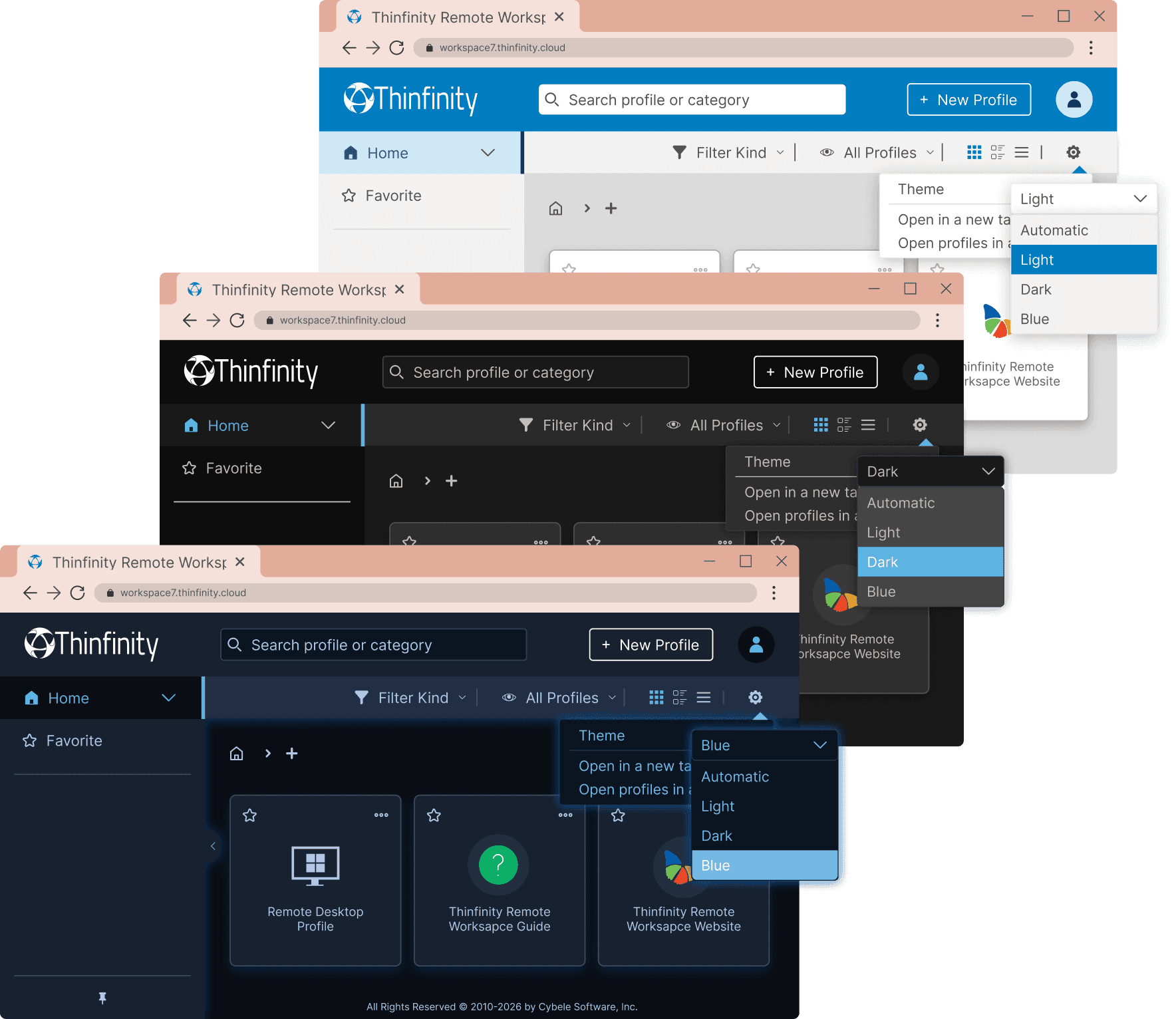
Thinfinity allows full customization of the web portal, enabling administrators to create multiple themes based on specific users or user groups. This feature supports multi-tenant identity management, making it ideal for enterprises with multiple teams or Managed Service Providers (MSPs) managing different customers. Each identity or user group can have its own branding, theme, and style, providing a personalized experience while maintaining a unified deployment.
The ability to manage multiple identities on a single deployment streamlines operations for organizations with diverse teams, clients, or departments, ensuring efficient and consistent remote access management while enhancing user experience.
Theme JSON Configuration FileOEM
Thinfinity's OEM package enables organizations to integrate Thinfinity with larger on-premises systems, supporting scalability and deep integration with enterprise infrastructure. This package is designed for companies that require extensive backend management and need to tailor Thinfinity to meet complex operational needs. With OEM integration, businesses can deploy Thinfinity as part of their internal systems while maintaining full control over customization, security, and resource management.
This capability allows enterprises to leverage Thinfinity's features while integrating seamlessly with existing solutions, ensuring flexibility and scalability for growing operational demands.