
TN BRIDGE features
TN BRIDGE Host Integration Pack has been created for maximum simplicity in handling data between legacy-systems and your Microsoft® Windows application. Access mainframe screens through a set of properties, methods and events, allowing easy integration with programming languages like Visual Basic, VB.NET, C#, Delphi, etc.
Architecture
The architecture can be separated into three (3) key areas, classified by their functionality:
1. Mainframe Access Layer
Mainframe Access Controls communicate with mainframe systems, and expose a set of properties, methods and events to handle the data interchange. The TNB3270 and TNB5250 controls fall into this category.
2. Emulation Layer
The Emulation Layer is made up of four (4) terminal emulation controls. These controls Emulation Screen, Emulation Status Bar, Keyboard Handling, Macro Sequences and Profiles implement the main features for a terminal emulator program.
Emulation Status Bar: TNBStatusBar Component
Implements an emulation status bar. It works together with the TNBEmulator.
Macro Sequences: Macro Component
Implements the recording and playing of mainframe navigation sequences.
Emulation Screen: TNBEmulator Component
Implements an emulation panel that shows the host data and accepts input data that is sent to the mainframe. The displayed data is formatted according to the data stream format (3270 or 5250).
Hotspots: HotSpots Component
Based on Regular Expressions, the HotSpots component is used to control mainframe applications with the mouse. Includes full customization for screen recognition areas and appearance, etc.
Keyboard Handling: AidHook Component
Processes keyboard events and maps them to Emulation Function Keys and Attention Identifier Keys. The Emulation Function Keys are processed locally to manage the emulator behavior for input data (i.e. tab, cursor movement keys, Home key, etc.). The Attention Identifier Keys initiate the transmission of data, along with the proper Attention Identifier Code (i.e. enter, PF01, Clear, etc.).
3. Helper Controls
Synchronization: Sync Component
Provide a simplified interface for handling telnet components in synchronous mode.
XMLBroker Component
Implements the XML interface in the TN3270 and TN5250 components.
XMLTemplate Class
Implements the run-time side of the XML Templates technology, for producing custom XML content.
Macro Sequences: Macro Component
Implements the recording and playing of mainframe navigation sequences.
XMLVirtual Component
Implements a simulated TN3270/5250 component by using screens saved as XML files.
XMLClient Component
Implements the XML interface to the Emulation layer.
Trace: TnbTrace Component
Implements an application-side trace service for use with TN BRIDGE Development Lab. Generates trace information to allow real-time monitoring of communication events, mainframe screens, and method calls.
System Requirements
Hardware
- Pentium 2 or equivalent computer/processor. Recommended: Pentium 3 or superior.
- 256 Mb Memory (RAM).
- 50 Mb of free disk space
Software
Microsoft Windows Operating System:
- Windows Server 2003
- Windows Server 2008
- Windows Server 2012
- Windows Server 2012 R2
- Windows Server 2016
- Windows 11
- Windows 10
- Windows 8
- Windows 7
- Windows Vista
- Windows XP and older (ME/2k/98SE/NT)
- Microsoft® .Net Framework (only required for TN BRIDGE for .Net)
- Embarcadero Delphi (only required for TN BRIDGE for Delphi)
Scenarios

Government

Industrial

Healthcare

Financial Services
Development Lab
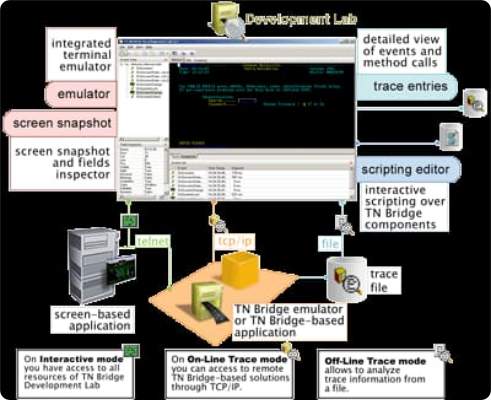
Research, tracking and testing environment that helps reduce the time required for planning, design, development, and QA.
Develop your PC-mainframe applications
- In planning/design time, because you will understand the screen/events sequences produced by your host application. Then you can plan and test your navigation strategy through the host screens.
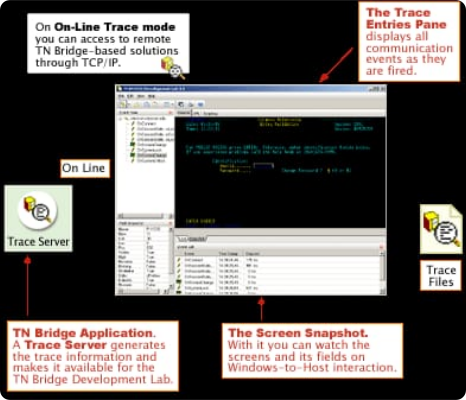
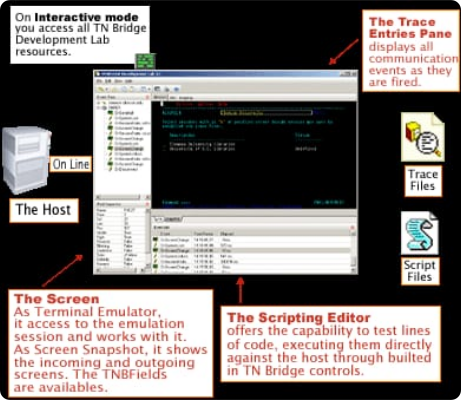
- During development time, using the remote tracking functionality where you can connect to your TN BRIDGE-based development, even running it on another computer. You can also work in interactive mode to create code snippets for pasting them into your application.
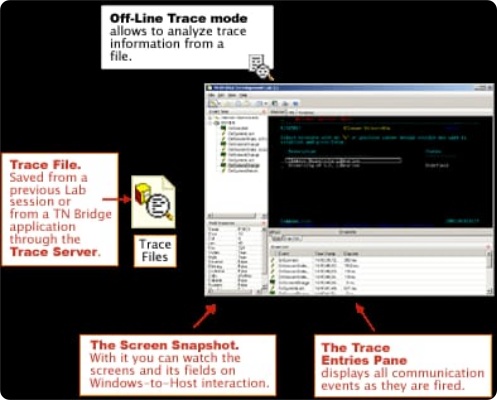
- To keep your deployed application error-free. You can use Development Lab to connect and track a running application even from a remote workstation. You can also save the trace information to a local file for external analysis.
Develop your PC-mainframe applications
Develop your PC-mainframe applications
Develop your PC-mainframe applications
Develop your PC-mainframe applications
Interactive
Access to all resources of TN Bridge Development Lab.
Online trace
Access to remote TN Bridge-based solutions through TCP/IP.
Offline trace
Allows the analysis of trace information from a file.