

z/Scope Anywhere features
Main Features
z/Scope Web Terminal Emulator provides a cost-effective alternative to your Legacy Terminal Emulator. Our solution includes a native HTML5 terminal emulator, with zero client setup, flexible licensing to meet the needs of a modern and growing workforce, comprehensive security, modernization tools and significantly reduced total cost of ownership.
Competitive advantages
Live user counting on your license tab
Get the basic information about how many users are accessing your host without going to the analytics.
Customizable styling
Select your preferred screen style and apply the font family that you like to set the most comfortable emulation for you. Compatible with Google Fonts.
User friendly interaction
Get a friendly and fast session edition with hotspots, keypads and auto-suggestion options.
Users profile
Define and use shared and private User Profiles, combining authenticated and anonymous access, if necessary.
Load balancing
Our workload balancing architecture ensures optimal resource allocation that will maintain full functionality.
File Transfer
Integrated FTP client, IND$FILE, KERMIT, X/Y/Z-MODEM transfer, with queue management.
Control panel
Admin Control Panel and Connection Statistics.
Versions
Standalone and Server versions are available.
Customizable macros
Save, use and manage customizable macros.
Terminal Emulation
Support for ANSI, VT52, VT100-VT420, TN3270E and TN5250E.
Integrated Printer Emulation
TN3287 and TN3812 emulation are supported.
Browser Based
Access your Mainframe, AS400 or Unix from any modern internet browser.
Multi-session
Open all the sessions you need and display them in a grid or separately.
Security
SSL/TSL and SSH 1/2 support.
JavaScript Integration
Accessing the terminal screen data with the new HLLAPI.js
z/Scope Anywhere allows programmers to create macros using JavaScript and a familiar set of function calls to access the terminal screen. The new HLLAPI.js is a subset of the standard HLLAPI specification adapted to the browser.
Create Web Applications and Widgets with HostSurfer.js JavaScript framework
The new HostSurfer.js is a JavaScript Framework that allows you to build Web Applications and Widgets using the terminal screen as a data source. HostSurfer plays very well with popular JavaScript Frameworks like Angular, React, Vue.js, etc., allowing you to build rich web applications fully synchronized with the terminal screens.
Mainframe Modernization
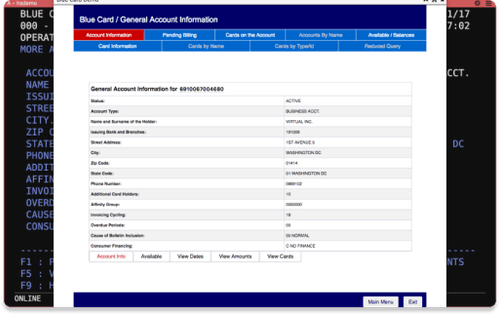
Extend green-screen applications using rich web interfaces. Simple, intuitive, always modern.
Improve the user experience
Get a new, enhanced end-user experience (UX) with a rich UI, extended navigation and external datasource integration.
Modernize legacy applications
Modernize whole applications or parts of them without altering the standard application access or behavior.
Create supercharged macros and web widgets using Javascript
HLLAPI.js
The HLLAPI Javascript library provides a subset of the de facto standard IBM HLLAPI specification, adapted to the web browser.
HostSurfer.js
Specialized JavaScript Framework that provides high-level two-way data access to the terminal screen, full WebUI/host-screen synchronization, screen identification rules, high-level navigators, etc.
No extra expenses
HLLAPI.js and HostSurfer.js are included on your z/Scope Anywhere permanent license.
Standard JS compatible
HLLAPI.js and HostSurfer.js are written in pure JavaScript. Combine vanilla JavaScript or any other popular JavaScript framework.
Short learning curve
With HostSurfer you don’t need to hire highly specialized developers. Any Javascript developer will master the technology in no time.
Build long-term solutions
Based in cutting-edge technologies, HostSurfer ensures solid applications for today and for the future.
Extend your apps to the web
Turn data from any green-screen application into web and mobile experiences.
Enhance employee productivity
Reduce de learning curve and optimize training time for new employees by updating your application front end and getting a more friendly user experience.
How z/Scope Anywhere works
Security Enhancement for your Terminal Emulation
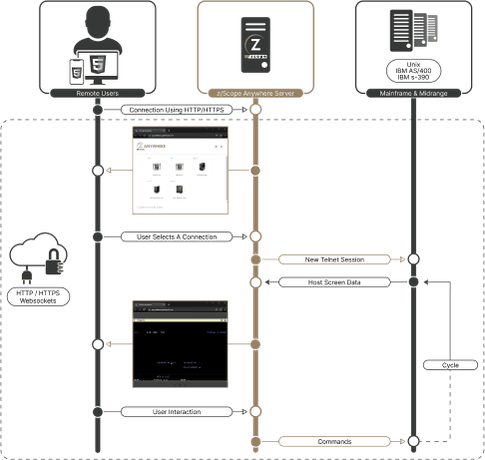
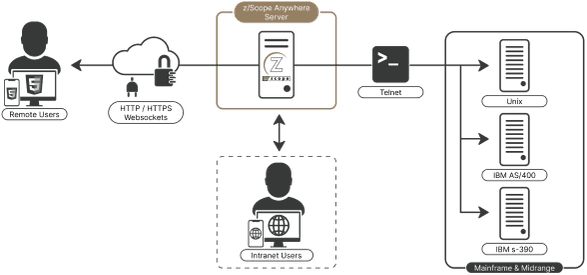
Our web-based Terminal Emulator client solution is based on a 3-tier architecture composed of the Browser, the Server and the Host. The z/Scope Anywhere Server is a secure, high-performance HTTP / WebSockets server, which serves the web pages needed to run the z/Scope Anywhere Web Client on any HTML5-capable browser. Relying on the HTML5 technology, z/Scope Anywhere does not require any plugin to run. This simplifies the end-user access with a solid, but easy-to-adopt clientless solution. The 128-bit encryption provided allows users to securely access remote hosts over any network, and safely transfer files between systems.
Scaling and Load Balancing
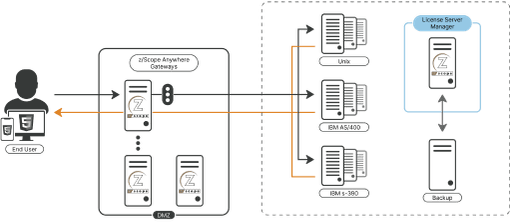
The following scheme shows z/Scope Anywhere running in a Load Balancing scenario.
Architecture
System Requirements
Administrator rights are needed for the installation process. It is a recommendedbest practice to create a system restore point before you remove or install software.
Client
- OS independent
- HTML5-compliant Web Browser
Host
- IBM Mainframe
- AS/400
- Unix
Server
- Windows 7 32-bit / Windows 7 64-bit
- Windows 8 32-bit / Windows 8 64-bit
- Windows 10 32-bit / Windows 10 64-bit
- Windows 11
- Windows Server 2008 32-bit /
- Windows Server 2008 64-bit
- Windows Server 2012
- Windows Server 2012 R2
- Windows Server 2016
- Windows Server 2022
Gateway
- Windows XP 32-bit / Windows XP 64-bit
- Windows Vista 32-bit / Windows Vista 64-bit
- Windows 7 32-bit / Windows 7 64-bit
- Windows 8 32-bit / Windows 8 64-bit
- Windows 10 32-bit / Windows 10 64-bit
- Windows 11
- Windows Server 2003 32-bit / Windows Server 2003 64-bit
- Windows Server 2008 32-bit / Windows Server 2008 64-bit
- Windows Server 2012
- Windows Server 2012 R2
- Windows Server 2016
- Windows Server 2022