|Manuals

General

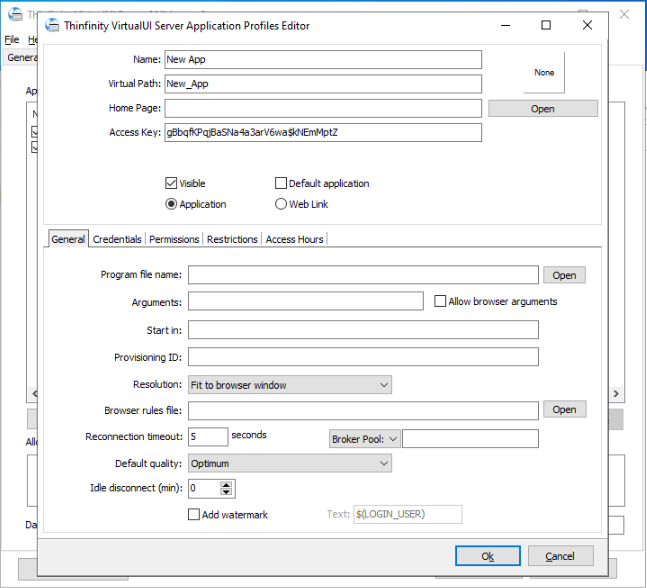
In the Application Profile Editor General tab you will find the following options.

Application Profile Editor, General tab

Profile Identity

Option Description
Name The display name of the profile, as users see it on the Home page.
Virtual Path The URL path that identifies this profile on the server.
Home Page The web page associated with the profile.
Access Key A key that grants direct access to the profile. Select New Key to generate one.
Label(s) Labels used to organize and group profiles. Select Select Label to assign them.
Change Icon / Clear Set or remove the icon shown for this profile on the Home page.
Default application Make this profile the one that opens by default.
Visible Show the profile on the Home page. Uncheck it to hide the profile from the listing while keeping it accessible by direct URL.
Open in new tab Open the application in a new browser tab.

Application Settings

Option Description
Program file name Specify the complete path to the application executable file.
Arguments Application arguments.
Start in Enter a context directory for the application set in the Program file name field.
Allow browser arguments Let the end user pass command-line arguments to the application through the URL. See Passing Command Line Arguments to VirtualUI Apps.
Resolution Choose from the available list of resolutions — including Fit to browser window, ideal for hiding the browser and working on a full screen mode — up to 3840×2160.
Browser rules file Specify the location of a file composed of a ruleset to adjust the remote desktop resolution. See Enhanced Browser and DPI Support for more information.
Reconnection timeout How long, in seconds, Thinfinity VirtualUI Server waits before killing the application once the browser has been closed. A value of 0 kills the application immediately. The default is 5.
Home Page The web page served when the profile’s virtual path is opened. Leave it empty to use the default client page (app.html), or point it to a customized copy to serve a custom page for this profile — its folder becomes the base path for the page’s resources.
Default quality The initial image quality for the session: Highest, Optimum, Good, or Fastest.
Idle disconnect (min) Disconnects the session after the specified number of minutes without user activity, up to 1440. Set it to 0 to disable the inactivity cut-off. Unlike Reconnection timeout, which acts once the browser is closed, this acts while the browser stays open but idle.
Broker Pool / Agent Pool The pool this application runs in, when the environment uses brokers or agent pools.

Read more