
Folders
In the Thinfinity VirtualUI Manager Folders tab you will find the following options.
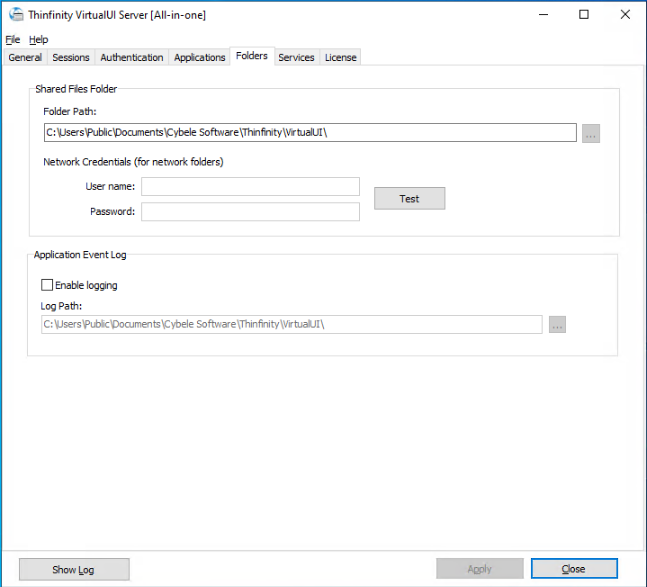
Shared Files Folder
This folder is the staging area for file transfers between the browser and your applications: files uploaded from the browser are placed here, and the virtualized Open/Save dialogs use it as their default location. Each application process works in its own subfolder, named after its process ID. When the folder is left empty, Thinfinity VirtualUI uses C:\Users\Public\Documents\Cybele Software\Thinfinity\VirtualUI.
| Option | Description |
|---|---|
| Folder Path | Enter the path of the shared files folder. It can be a local path or a network location — use a network share, with the credentials below, when several servers must share the same staging location. |
| User name | Enter the username Thinfinity VirtualUI will use to access the network location, if credentials are required. |
| Password | Enter the password for the network credentials. |
| Test | Test the credentials entered to verify they can access the network location. |
Application Event Log
Enable logging of application events to a folder.
| Option | Description |
|---|---|
| Enable logging | Check this option to write application event logs to disk. |
| Log Path | Enter the folder where Thinfinity VirtualUI stores the application event log files. |
Always remember to select Apply in order to save the changes.