
Scaling and Load Balancing Configurations
Load Balancing is no longer available in Thinfinity VirtualUI. This capability is now provided exclusively by Thinfinity Workspace — see Load Balancing and Failover in the Thinfinity Workspace manual for details.
If you determine that your Thinfinity VirtualUI environment would benefit from using Load Balancing, you can choose between different scenarios. This decision is an essential step in planning the hardware scheme and configuring the system to work in a distributed way.
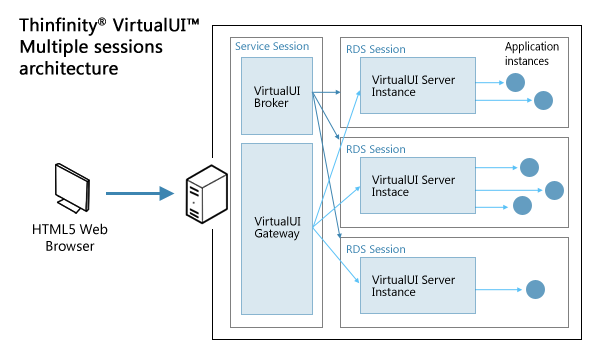
Scenario 1: Multiple RDS accounts
This architecture involves only one computer. Each RDS session creates a Server instance which can, in turn, handle application instances separately. The VirtualUI Broker administrates the server instances: checks up on them to see if they are functional, and works together with the Gateway to distribute the connections.
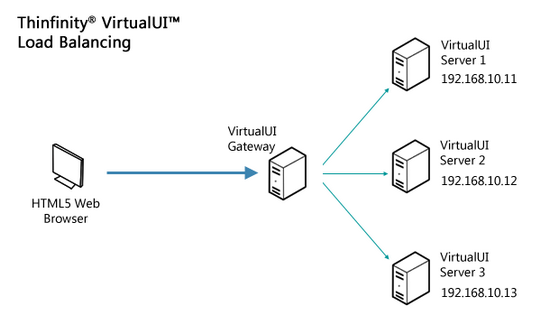
Scenario 2: Multiple Servers with Load Balancing
In this simple scenario, a single Gateway distributes the connection load between a number of Servers.
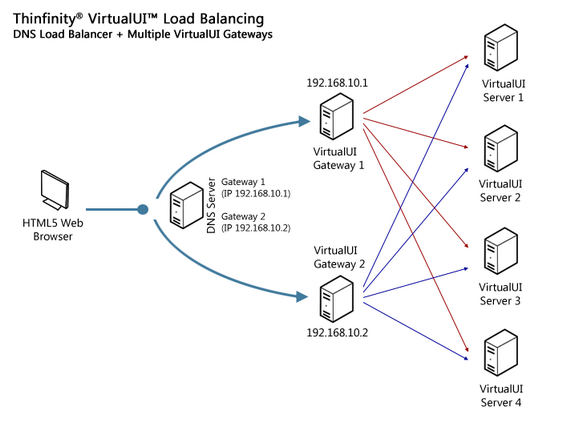
Scenario 3: Multiple Gateways and Servers with Load Balancing
This example combines a external load balancing DNS Server with multiple Gateways. The scheme is composed of multiple Servers, multiple Gateways and the DNS Server, its domain name associated to all the available Gateways’ IPs.
Scenario 4: Multiple RDS accounts and multiple Servers with Load Balancing
Combine load balancing with multiple RDS sessions to get the most out of your architecture.