
Authentication
The Authentication tab will allow you to choose the authentication methods to access Thinfinity VirtualUI.
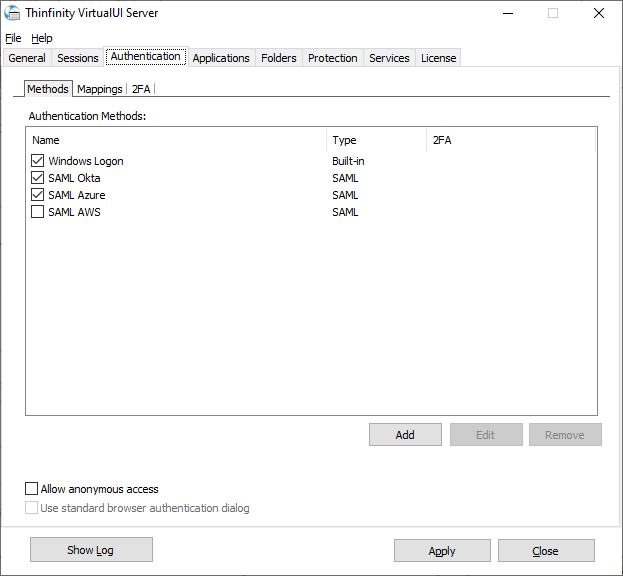
The tab is organized in these sub-tabs.
| Sub-tab | Purpose |
|---|---|
| Methods | Enable and configure the authentication methods. |
| Mappings | Associate the identities returned by each method with Windows accounts. See Mappings. |
| 2FA | Add a second authentication factor: TOTP, DUO, or Radius MFA. See 2FA. |
Methods
The Add button offers these method types: Windows Logon, API Access, Radius, SAML, Passkeys, OAuth 2.0 — with Google, Facebook, and Other presets — and External DLL.
Choose your authentication method(s) in the Methods sub-tab:
| Option | Description |
|---|---|
| Authentication methods | This list shows the available authentication methods. You can enable or disable them by checking the box to the left of the name. |
| Add | Select this button to add a new authentication method. Each method presented will open a new form for you to fill in the relevant information. |
| Edit | Select an authentication method and select this button to edit it. |
| Remove | Select an authentication method and select this button to remove it. |
| Allow anonymous access | Check this to allow anonymous access. This means that users can access anonymous access profiles without any kind of authentication. |
| Use standard browser authentication dialog | Check this to use the standard browser authentication dialog. When this is unchecked, users will authenticate through the VirtualUI web login. |