
OnPropertyChange(), OnSet() and OnGet() Events
When publishing a model, jsRO will keep the state of the created object synchronized in the application side and in the browser. Each time a property is updated in the server side, this change is propagated to the browser, where besides updating the value it can be handled by the corresponding .on(“model:object.property”, “change”, …) event, if this event was declared.
When a property is updated on the browser side, this change is sent in the opposite direction (from the web to the application) and triggers an OnPropertyChange event in the instantiated JSObject object. This is a good place to do things like propagating the change of a property value to some other element of the application, update a group of values in a database, etc.
jsRO can also handle changes in the properties of its object through the declaration of the OnSet and OnGet property events.
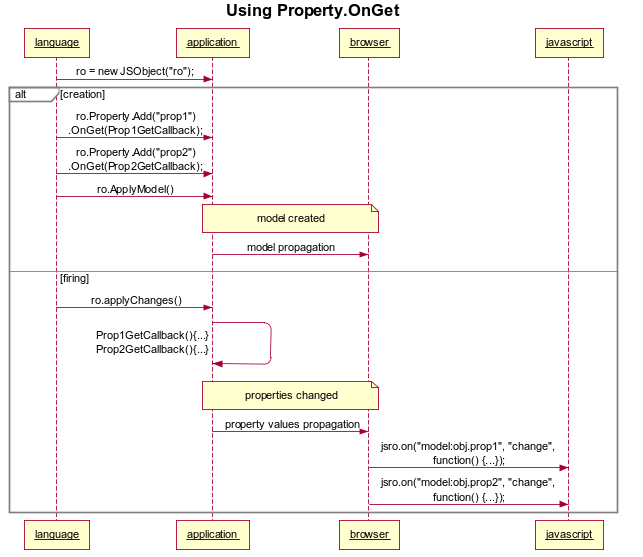
By invoking the ApplyChanges method on a JSObject object, the collection of the properties added to the object is traversed and if any of these properties has an OnGet event declared, it’s triggered.
The OnSet event, however, is executed when it receives a change from a particular property from the browser.
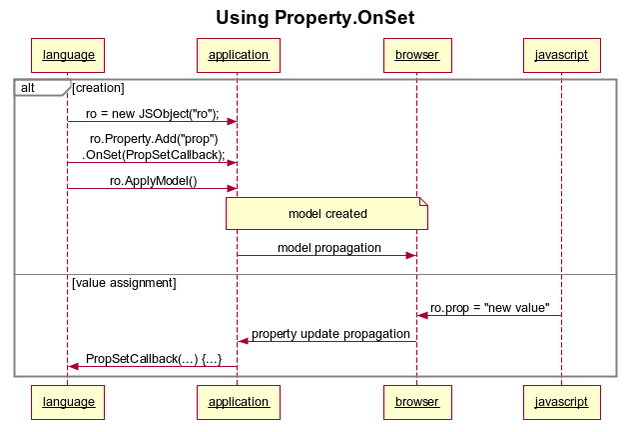
The way to add the OnSet and OnGet event handlers to a property is based on their definition, you can do so when of adding the property or afterwards, always remember to fire an ApplyModel so that the model is propagated to the browser.
The next example shows how the browser can retrieve the application form background color in a #RRGGBB format, and also how to change the background color using a value sent from the browser. Since the desktop application doesn’t interpret colors like the web does, we need a conversion that works both ways:
Delphi Definition:
// Creates the remote object
FRo := TJSObject.Create('ro');
// Property definition
FRo.Properties.Add('backgroundColor')
    .OnGet(TJSBinding.Create(
        procedure(const Parent: IJSObject; const Prop: IJSproperty)
            begin
                Prop.AsString := '#'
                + IntToHex(GetRValue(ColorToRGB(Form1.Color)), 2)
                + IntToHex(GetGValue(ColorToRGB(Form1.Color)), 2)
                + IntToHex(GetBValue(ColorToRGB(Form1.Color)), 2);
            end))
        .OnSet(TJSBinding.Create(
            procedure(const Parent: IJSObject; const Prop: IJSproperty)
                var
                    value: string;
                begin
                    value := LowerCase(Prop.AsString);
                    if ((Length(value) = 7) and (copy(value, 1, 1) = '#')) then
                    begin
                        try
                            Form1.Color := RGB(
                                StrToInt('$' + Copy(value, 2, 2)),
                                StrToInt('$' + Copy(value, 4, 2)),
                                StrToInt('$' + Copy(value, 6, 2))
                            );
                        except
                        end;
                    end;
                end));
.Net definition:
// Creates the remote object
ro = new JSObject("ro");
// Property definition
ro.Properties.Add("backgroundColor")
    .OnGet(new JSBinding(
        // This anonymous procedure do the actual get
        delegate(IJSObject Parent, IJSProperty Prop)
        {
            Prop.AsString = "#"
                + this.BackColor.R.ToString("X2")
                + this.BackColor.G.ToString("X2")
                + this.BackColor.B.ToString("X2");
        }))
    .OnSet(new JSBinding(
        // This anonymous procedure do the actual set
        delegate(IJSObject Parent, IJSProperty Prop)
        {
            string value = Prop.AsString.ToLower();
            Regex reColor = new Regex(@"^#([0-9,a-f]{6})$");
            Match match = reColor.Match(value);
            if (match.Success)
            {
                string color = match.Groups[1].Value;
                this.BackColor = Color.FromArgb(
                    int.Parse(color.Substring(0, 2), NumberStyles.AllowHexSpecifier),
                    int.Parse(color.Substring(2, 2), NumberStyles.AllowHexSpecifier),
                    int.Parse(color.Substring(4, 2), NumberStyles.AllowHexSpecifier)
                );
            }
        }));
Assigning the property value in Javascript:
ro.backgroundColor = “#FF0000”;