
Remote Printing SDK for Thinfinity - C#
Objective
The Remote Printing SDK allows you to programmatically send commands and documents to the end-user’s printer. Currently, raw printers are supported.
Components
| Component | Description |
|---|---|
Remote Printer SDK Library (Thinfinity.RemotePrinter.dll) |
This module presents a COM API to be consumed by a Windows application running under Thinfinity VirtualUI or Thinfinity Remote Desktop. |
| Thinfinity Local Agent and Local Printer Plugin | Executable and library needed to work as a nexus between the web browser and local or network resources, otherwise inaccessible due to browser’s security restrictions. |
| Thinfinity Virtual Channels | A proprietary Virtual Channel System used to communicate the Remote Printer SDK with the Local Printer plugin. |
Basic Scheme
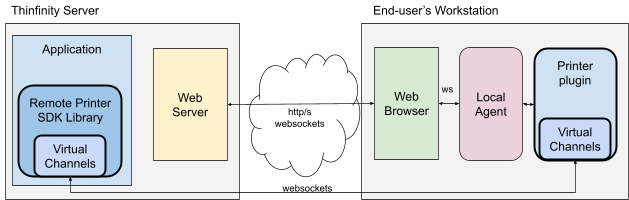
The Remote Printer SDK tasks:
- Retrieve the printer list.
- Prepare the connection for printing.
- Send data to the printer
- Inform the end of the printing process.
- In case of any error must be Cancel the printing or if the user wants.
- In case of any error, can get it more details using LastError method
API
The following table shows the methods of the Remote Printer SDK.
GetPrinters
bool GetPrinters(string Delimiter, out string Printers);
Retrieve all printer names detected on the end-user’s side. Returns a string delimited by the Delimiter parameter.
Returns: True if is successful and False in case of error.
Parameters:
| Parameter | Type | Description |
|---|---|---|
| Delimiter | String | Character or string used as delimiter of the printer names on Printers param. |
| Printers (out) | String | Out parameter filled with the printer names delimited by Delimiter param. |
LastError
void LastError(out int ErrorCode, out string ErrorMessage);
Retrieves the last ErrorCode and ErrorMessage. Can be used when a call to any method returns False.
Returns: nothing
Parameters:
| Parameter | Type | Description |
|---|---|---|
| ErrorCode (out) | Int | Out last error code. If ErrorCode is 0, there is no error. |
| ErrorMessage (out) | String | Out last error message. |
BeginDoc
bool BeginDoc(int PrintType, string PrinterName, string DocName, int Encoding, out string DocID);
It makes the connection with the printer and initializes the print job. Creates a unique Document Id to identify a print job in subsequent calls.
Returns: True if the communication and actions on the selected printer was sent successful.
Parameters:
| Parameter | Type | Description |
|---|---|---|
| PrintType | Int | Determines the type of printing. Now support PRINT_TYPE_RAW = 1 |
| PrinterName | String | The name that identifies the printer. |
| DocName | String | Name of the printer job to be created on the print spooler. |
| Encoding | Int | Identifies the format of the document to print. PRINT_ENCODE_ANSI = 0, PRINT_ENCODE_UTF8 = 1 |
| DocID (out) | String | This out parameter is filled with a unique document id to be used in subsequent calls. |
bool Print(string DocID, string Data);
Sends data to the printer using the document identifier obtained using BeginDoc. This method can be called as many times as needed to send commands or data until the entire print job is completed.
Returns: True if nothing went wrong.
Parameters:
| Parameter | Type | Description |
|---|---|---|
| DocID | String | The document identifier obtained by BeginDoc. |
| Data | String | Data to be sent to the Printer. |
EndDoc
bool EndDoc(string DocID);
Ends the print job. This completes the print process and sends the print job to the spooler.
Returns: True if the work was sent to the printer spooler.
Parameters:
| Parameter | Type | Description |
|---|---|---|
| DocID | String | The document identifier obtained by BeginDoc. |
Abort
bool Abort(string DocID);
Cancels the printer job. This method must be called in case of the methods Print or EndDoc return False.
Parameters:
| Parameter | Type | Description |
|---|---|---|
| DocID | String | The document identifier obtained by BeginDoc. |
PrintFile
bool PrintFile(int PrintType, string FileName, string PrinterName);
Sends the file to the print spooler of the remote printer. In case of PrinterName is Empty the default remote printer is used.
Parameters:
| Parameter | Type | Description |
|---|---|---|
| PrintType | Int | Determines the type of printing. PRINT_TYPE_XPS = 3, PRINT_TYPE_PDF = 4, PRINT_TYPE_DIRECT = 5 |
| FileName | String | Full FileName of the file to Print. |
| PrinterName | String | The name that identifies the printer. |