
schema.json and uischema.json Reference
When creating a VDI/DaaS model using a custom Terraform template, Cloud Manager can render a dynamic parameter form in the wizard’s Parameters step. This form is defined by two optional JSON files: schema.json and uischema.json.
schema.json— Declares the input variables your template expects: their names, types, validation rules, and default values.uischema.json— Controls how those variables are displayed in the Cloud Manager wizard: field types, labels, ordering, and grouping.
If neither file is provided, the Parameters step is skipped entirely.
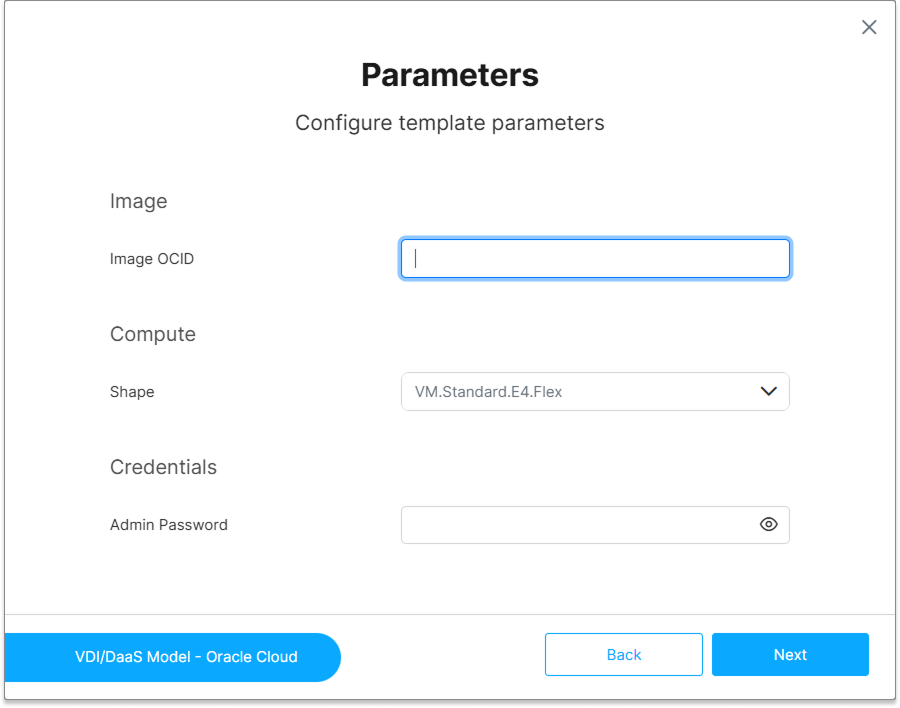
schema.json
schema.json follows the JSON Schema specification (draft-07 or later). It declares the set of parameters that Cloud Manager should collect from the administrator during model creation, and maps each parameter to a Terraform input variable.
Minimal structure:
{
  "$schema": "http://json-schema.org/draft-07/schema#",
  "type": "object",
  "properties": {
    "instance_type": {
      "type": "string",
      "title": "Instance Type",
      "description": "The VM size/type to provision.",
      "default": "t3.medium"
    },
    "ami": {
      "type": "string",
      "title": "AMI ID",
      "description": "The Amazon Machine Image ID to use."
    }
  },
  "required": ["ami"]
}
Supported Property Types
| JSON Schema Type | Typical UI Rendering |
|---|---|
string |
Text input |
number |
Numeric input (decimal) |
integer |
Numeric input (whole numbers) |
boolean |
Checkbox or toggle |
array |
Multi-value input |
uischema.json
uischema.json follows the JSON Forms UI Schema convention. It maps each property declared in schema.json to a specific UI control and defines the layout of the Parameters step.
Minimal structure:
{
  "type": "VerticalLayout",
  "elements": [
    {
      "type": "Control",
      "scope": "#/properties/instance_type",
      "label": "Instance Type"
    },
    {
      "type": "Control",
      "scope": "#/properties/ami",
      "label": "AMI ID"
    }
  ]
}
Supported Layout Types
| Layout | Description |
|---|---|
VerticalLayout |
Stacks controls vertically (default) |
HorizontalLayout |
Places controls side by side |
Group |
Groups controls under a labeled section header |
Categorization |
Organizes controls into tabs |
Variable Mapping
The property names declared in schema.json must match the variable names declared in your Terraform template’s variables.tf. Cloud Manager maps each form field directly to the corresponding Terraform input variable and passes the values at deployment time.
Reserved Variables
Cloud Manager populates a set of reserved variables automatically at deployment time. Do not declare them as properties in schema.json — the Parameters step would expose them to administrators and the values would be silently overridden at deployment time. For the full list, see Terraform Overview — Reserved Variables.
Complete Example
The following example defines a parameter form for an AWS-based template that lets the administrator choose the EC2 instance type and the target region.
schema.json:
{
  "$schema": "http://json-schema.org/draft-07/schema#",
  "type": "object",
  "properties": {
    "region": {
      "type": "string",
      "title": "AWS Region",
      "description": "The AWS region where instances will be deployed.",
      "default": "us-east-1",
      "enum": ["us-east-1", "us-west-2", "eu-west-1", "ap-southeast-1"]
    },
    "instance_type": {
      "type": "string",
      "title": "Instance Type",
      "description": "EC2 instance type (e.g., t3.medium, m5.large).",
      "default": "t3.medium",
      "enum": ["t3.small", "t3.medium", "t3.large", "m5.large", "m5.xlarge"]
    }
  },
  "required": ["region", "instance_type"]
}
uischema.json:
{
  "type": "VerticalLayout",
  "elements": [
    {
      "type": "Control",
      "scope": "#/properties/region",
      "label": "AWS Region"
    },
    {
      "type": "Control",
      "scope": "#/properties/instance_type",
      "label": "Instance Type"
    }
  ]
}
Corresponding variables.tf:
variable "region" {
  type    = string
  default = "us-east-1"
}

variable "instance_type" {
  type    = string
  default = "t3.medium"
}

# Reserved — populated by Cloud Manager. Do not add to schema.json.
variable "vmname" {
  type    = string
  default = ""
}
What’s Next
- Create a Model Using a Custom Terraform Template — See how schema files are uploaded and used in the wizard
- Terraform Overview — VM Template, instance naming, and Shared Template concepts
- Terraform Errors — Schema validation errors and common issues
See Also