
Cursor
In the Cursor tab you will find the following parameters:
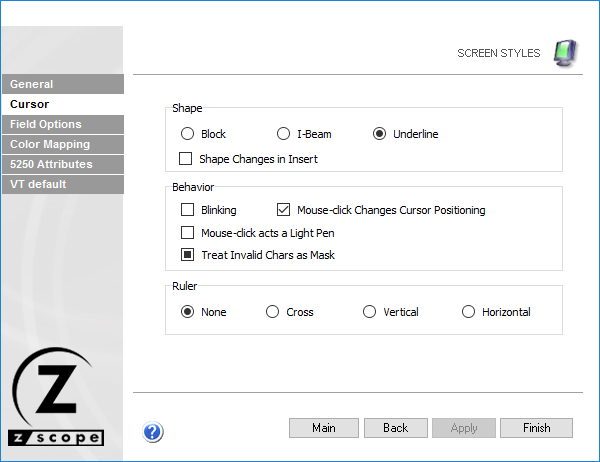
The following table describes the available options.
| Option | Description |
|---|---|
| Shape | Cursor shape: Block, I-Beam, or Underline. |
| Shape Changes in Insert | Changes cursor shape in insert mode, as a visual reminder of the current editing mode. |
| Blinking | Makes the cursor blink. |
| Mouse-Click Changes Cursor Positioning | Allows changing the cursor position on the screen using the mouse. |
| Mouse-Click Acts as a Light Pen | Treats mouse clicks as Light Pen input. |
| Treat Invalid Chars as Mask | When checked, invalid characters for the field type are treated as a mask instead of producing an error. When unchecked, they are treated as errors and cannot be edited. When grayed, the default value applies. |
| Ruler | Guidelines indicating the cursor position on screen: Vertical, Horizontal, Cross (both), or None. |
See Also
- Configuration Manager - Screen Styles - General Settings
- Configuration Manager - Screen Styles - Field Options Settings
- Configuration Manager - Screen Styles - Color Mapping Settings
- Configuration Manager - Screen Styles - 5250 Attributes Settings
- Configuration Manager - Screen Styles - VT Defaults Settings