
General
In the General tab you will find the following parameters:
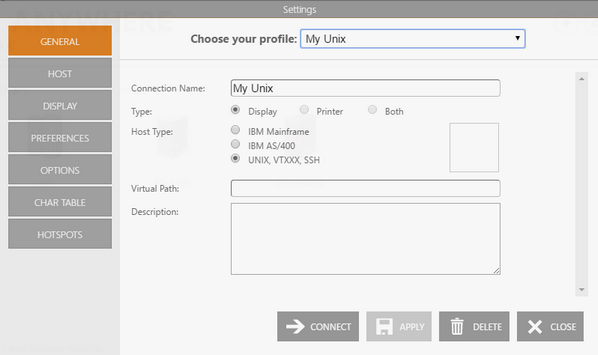
The following table describes the available options.
| Option | Description |
|---|---|
| Connection Name | Name to identify the connection. This field is mandatory. |
| Host Type | Select UNIX,VTXXX, SSH as the host type. |
| Icon | Select the square next to the Host Type options to choose a different icon for the connection. |
| Virtual Path | Creates a unique URL address for this connection. The complete path consists of http(s)://YourDomain:port/VirtualPath/. Users can create a web shortcut to this connection and bypass the z/Scope Anywhere web interface. |
| Description | A longer description for the connection. |
See Also
- Unix/VT Connections - Host Settings (Web Interface)
- Unix/VT Connections - Backup Settings (Web Interface)
- Unix/VT Connections - Display Settings (Web Interface)
- Unix/VT Connections - Socks Settings (Web Interface)
- Unix/VT Connections - SSL ettings (Web Interface)
- Unix/VT Connections - SSH Settings (Web Interface)
- Unix/VT Connections - Preference Settings (Web Interface)
- Unix/VT Connections - Options Settings (Web Interface)
- Unix/VT Connections - Char Table Settings (Web Interface)
- Unix/VT Connections - HotSpots Settings (Web Interface)