
Permissions
In the Permissions tab you will be able to select users and give them special permission to access different z/Scope Anywhere features:
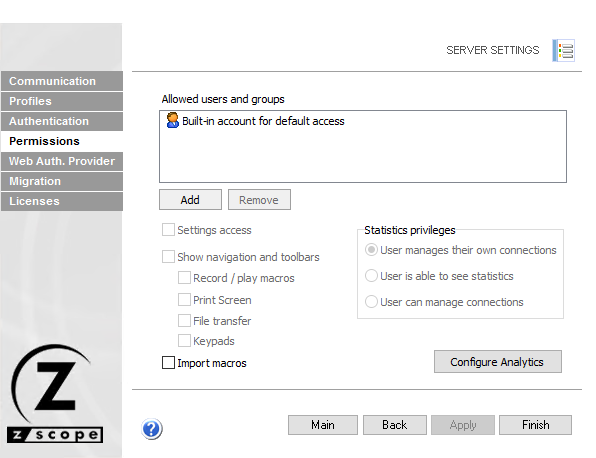
The following table describes the available options.
| Option | Description |
|---|---|
| Add | Adds a new Active Directory user or group into the Permissions list. |
| Remove | Removes all permissions from the selected user or group. |
| Built-in Account for Default Access | Default account for anonymous access. |
| Settings Access | Gives the selected user access to open Settings from the Start Page. |
| Show Navigation and Toolbars | Controls visibility of navigation controls (Navigation, Connection Toolbar). When disabled, the following options are also disabled. |
| Record/Play Macros | Enables the Record and Play macros feature. |
| Print Screen | Allows taking print screens from an active connection. |
| File Transfer | Gives access to File Transfers. |
| Keypads | Allows access to connection Keypads. |
| Import Macros | Allows importing Macros. |
| User Manages Their Own Connections | User can only open and disconnect their own connections. |
| User is Able to See Statistics | User can see system statistics for all users. |
| User Can Manage Connections | User can see and manage all z/Scope Anywhere connections and sessions. |
| Configure Analytics | Access MS SQL to set up a database for Analytics data. See Configure MS SQL Server. |
See Also
- Configuration Manager - Server Settings - Communication Settings
- Configuration Manager - Server Settings - Profiles Settings
- Configuration Manager - Server Settings - Authentication Settings
- Configuration Manager - Server Settings - Web Auth Provider Settings
- Configuration Manager - Server Settings - Migration Settings
- Configuration Manager - Server Settings - Licenses Settings