
Using Macros
In order to run one of the available macros for the current connection, select the Macros icon present on the Connection View menu:
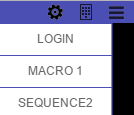
Select the macro you want to execute (available macros in this example are: LOGIN, MACRO 1 and SEQUENCE2) and the keystroke sequence contained in the macro will automatically be reproduced within the active screen. Keep in mind that macros can only be triggered within the connection they were created.