
Host
In the Host tab you will find the following parameters:
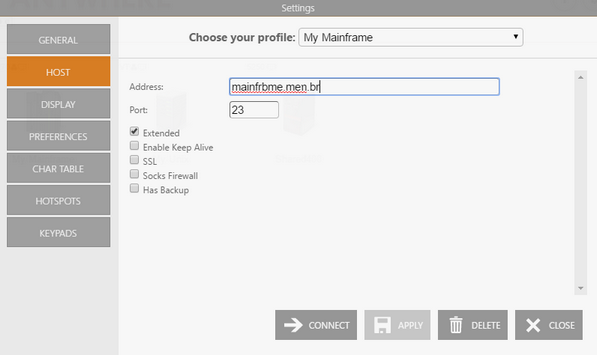
The following table describes the available options.
| Option | Description |
|---|---|
| Address | URL or IP address of the host computer. |
| Port | TCP port defined at the host computer for Telnet access. The default Telnet port number is 23. |
| Extended | Enables Telnet Extended protocols (TN3270E or TN5250E). This setting enables User Id and Password input boxes for AS/400 connections. |
| Enable Keep Alive | Enables the keep-alive mechanism, needed for some Telnet servers to prevent disconnections. |
| SSL | Enables the SSL (Secure Sockets Layer) protocol for the host. When you check this option, the SSL tab automatically appears in the connection settings dialog. See Using SSL. The SSL and SSH options are mutually exclusive. |
| Socks Firewall | Enables support for Socks firewall. When you check this option, the Socks tab automatically appears in the connection settings dialog. |
| Has Backup | Enables an alternate IP for this connection. When you check this option, the Backup tab automatically appears in the connection settings dialog. |
For AS/400 connections, you will also see these additional fields:
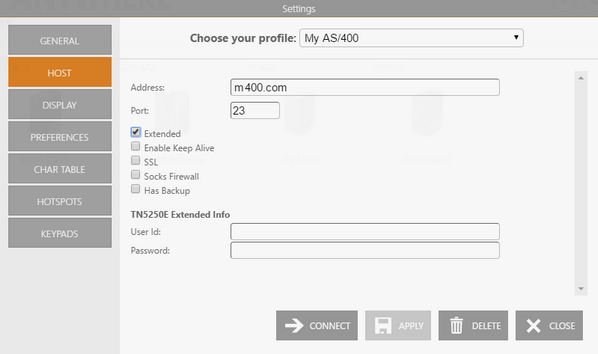
| Option | Description |
|---|---|
| TN5250E Extended Info | User Id and Password for TN5250E extended connections. |
See Also
- Mainframe/AS400 Connections - General Settings (Web Interface)
- Mainframe/AS400 Connections - Backup Settings (Web Interface)
- Mainframe/AS400 Connections - Display Settings (Web Interface)
- Mainframe/AS400 Connections - Printer Settings (Web Interface)
- Mainframe/AS400 Connections - Socks Settings (Web Interface)
- Mainframe/AS400 Connections - SSL Settings (Web Interface)
- Mainframe/AS400 Connections - Preferences Settings (Web Interface)
- Mainframe/AS400 Connections - Char Table Settings (Web Interface)
- Mainframe/AS400 Connections - HotSpots Settings (Web Interface)
- Mainframe/AS400 Connections - Keypads Settings (Web Interface)