
Profiles
In the Profiles tab you will find the following parameters:
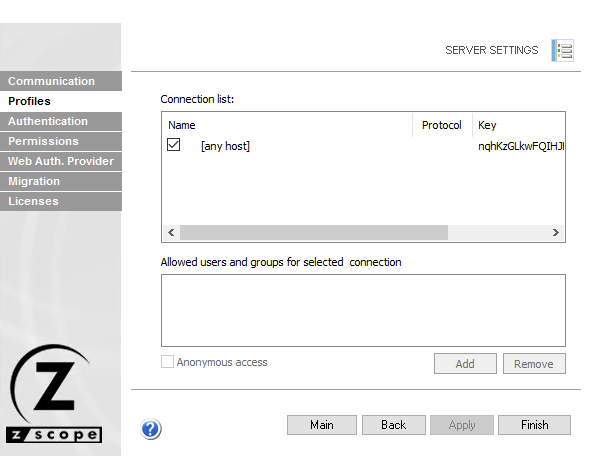
The following table describes the available options.
| Option | Description |
|---|---|
| Name | Name of the listed connection profiles. Uncheck the checkbox beside a connection to inactivate it and hide it from the web interface. |
| Protocol | Protocol for the profile’s connection. |
| Key | Access key for the profile. |
| Add | Grants permission to a new user or group for the selected connection. |
| Remove | Removes permission from a listed user or group for the selected connection. |
| Anonymous Access | Makes the connection available without authentication. Checking this option disables Add and Remove. |
See Also
- Configuration Manager - Server Settings - Authentication Settings
- Configuration Manager - Server Settings - Communication Settings
- Configuration Manager - Server Settings - Permissions Settings
- Configuration Manager - Server Settings - Web Auth Provider Settings
- Configuration Manager - Server Settings - Migration Settings
- Configuration Manager - Server Settings - Licenses Settings