
Creating a Macro
The Macro creation process is very simple. You can create it on an active connection through the Connection view Menu.
Creating a Macro
| Icon | Description |
|---|---|
 |
Open the Settings Select the Settings button and a menu will be presented. |
 |
Record Select the Record button, execute the actions to be automated and send them to the host (enter key). |
 |
Save the Macro Select Save button, also accessible through the settings button. |
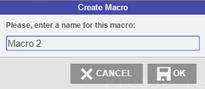 |
Name the Macro No more actions will be recorded, and you will be prompted for a name to the new macro. Enter a name and select OK. |
Info
Once pressed, the Record button will be replaced by the Save button.
Info
All macros saved for a particular connection will be available by selecting the Macro’s toolbar button. See also: Using Macros.
To learn how to use and manage the macros you have created, see the next topics: