
License Activation
This is how the License Manager should look once your license is registered:
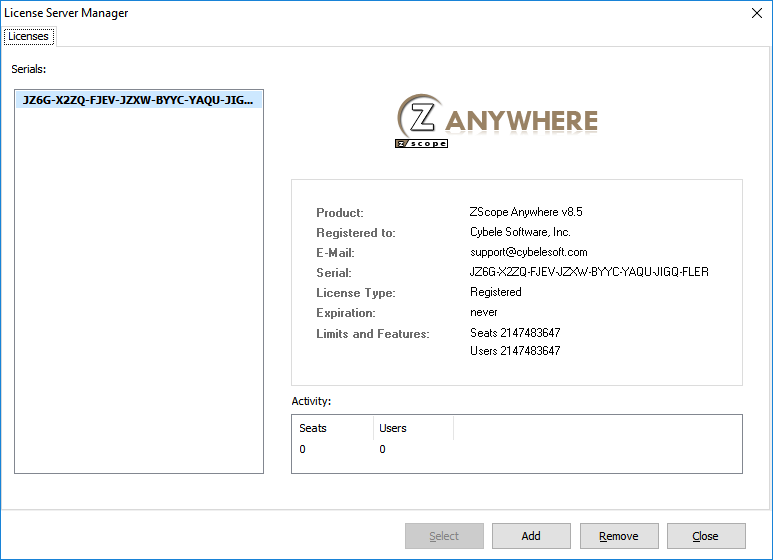
| Button | Description |
|---|---|
| Select | If you registered several serials on this server, select this button to select the key you wish to use. |
| Add | Select this button to enter your license information. |
| Remove | Select this button if you wish to deactivate the license on this machine. This will allow you to use the license somewhere else, or to re use the license after reinstalling Windows. |
| Close | Select this button to close the License Manager |
| Activity | Here you can verify in real time the amount of users consuming a license. |
Selecting the Add button will open the Product Registration Wizard:
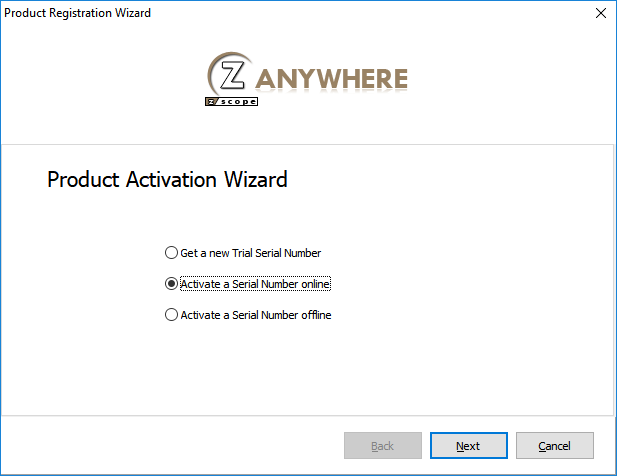
| Option | Description |
|---|---|
| Get a new Trial Serial Number | Select this option to receive a 30 day trial serial. |
| Activate a Serial Number Online | Select this option to register you z/Scope Anywhere serial. |
| Activate a Serial Number Offline | Select this option to register a license offline. |
Read More: