
Backup
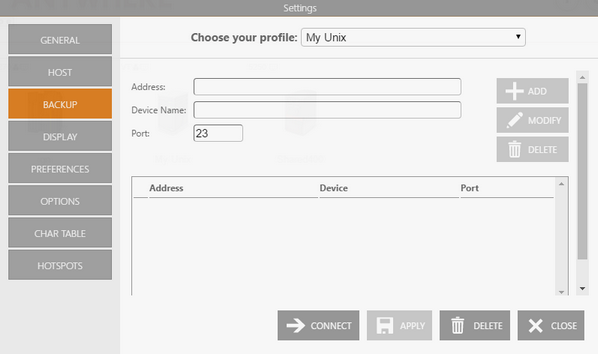
In the Backup tab you will see a table showing the list of alternate hosts for the connection. If the connection fails, z/Scope will connect to an alternate host, starting with the first one in the list. If an alternate host fails, z/Scope will connect to the next one in the list, and so on.
Info
This tab only becomes available when the Has Backup option is checked in the Host tab.
The following table describes the available options.
| Option | Description |
|---|---|
| Address | IP address of the alternate host to add for this connection. |
| Device Name | Device name for the alternate host. |
| Port | Port number for the alternate host. |
| Add | Adds the Address, Device Name, and Port information as a new host at the end of the list. |
| Modify | Replaces the selected host with the information entered in the Address, Device Name, and Port fields. |
| Delete | Removes the selected backup host from the list. |
See Also
- Unix/VT Connections - General Settings (Web Interface)
- Unix/VT Connections - Host Settings (Web Interface)
- Unix/VT Connections - Display Settings (Web Interface)
- Unix/VT Connections - Socks Settings (Web Interface)
- Unix/VT Connections - SSL ettings (Web Interface)
- Unix/VT Connections - SSH Settings (Web Interface)
- Unix/VT Connections - Preference Settings (Web Interface)
- Unix/VT Connections - Options Settings (Web Interface)
- Unix/VT Connections - Char Table Settings (Web Interface)
- Unix/VT Connections - HotSpots Settings (Web Interface)