
Configure HTTP Error Responses
You can access configuration for the HTTP Error response pages by pressing this button:

which you will find in the Gateway Manager General tab, when the protocol is set to HTTPS.
You will be presented with the following dialog:
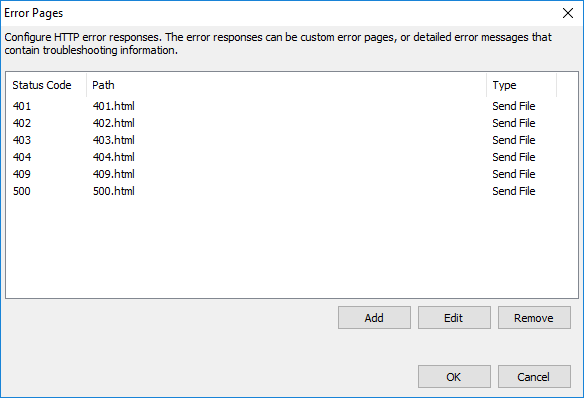
The following table describes the available options.
| Option | Description |
|---|---|
| Status Code | Numeric code indicating the response status when a browser connects to z/Scope Anywhere. The HTTP status code indicates whether a request is successful or unsuccessful, and the reason. |
| Path | Path to the error file shown for a particular status code. The default path is the webzs directory in the z/Scope Anywhere installation directory. |
| Type | Action in the event of an error: Send file (shows an error page stored locally) or Redirect (redirects to a web page indicated in the configuration). |
| Add | Adds a new Custom Error page. |
| Edit | Edits an existing Custom Error page. |
| Remove | Removes the selected Custom Error page. |
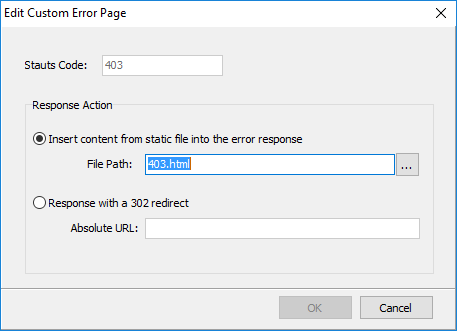
When adding or editing a Custom Error page, the following dialog is presented:
| Option | Description |
|---|---|
| Status Code | Status code to configure. |
| Response Action | Whether z/Scope Anywhere shows a locally stored page or redirects to another web page. |
| Insert Content from File into the Error Response | Shows a static page locally stored on your z/Scope Anywhere server. Select the file with the browse button. |
| Response with a 302 Redirect | Redirects users to a web page. Enter the absolute URL in the field below. |