
Preferences
In the Preferences tab you will find the following parameters:
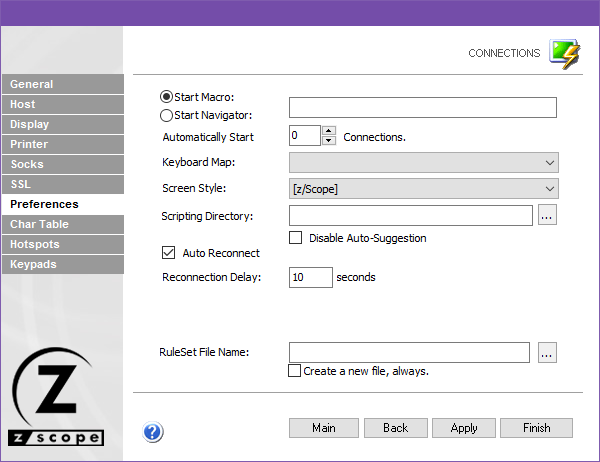
The following table describes the available options.
| Option | Description |
|---|---|
| Start Macro/Navigator | Select a Macro or Navigator to start automatically when connecting. |
| Automatically Start [n] Connections | Number of sessions to establish automatically upon z/Scope start. |
| Keyboard Map | Keyboard map for this connection. |
| Screen Style | Default Screen Style for this connection. |
| Scripting Directory | Folder on your local computer where script files are stored. |
| Disable Auto-Suggestion | Disables the Auto-Suggestion feature by default for this connection. |
| Auto Reconnect | Automatically reconnects to the host after logging off. |
| Reconnection Delay | Time in seconds to wait before auto-reconnecting to the host. |
| RuleSet File Name | File name and location of the .xsm XML file that establishes rules for saving and auto-completing variables in the screen. |
| Create a New File, Always | Generates the first ruleset file automatically. Uncheck to edit the file, or leave checked to regenerate each time z/Scope runs. |
See Also
- Configuration Manager - Connections - Mainframe/AS400 - General Settings
- Configuration Manager - Connections - Mainframe/AS400 - Host Settings
- Configuration Manager - Connections - Mainframe/AS400 - Backup Settings
- Configuration Manager - Connections - Mainframe/AS400 - Display Settings
- Configuration Manager - Connections - Mainframe/AS400 - Printer Settings
- Configuration Manager - Connections - Mainframe/AS400 - Socks Settings
- Configuration Manager - Connections - Mainframe/AS400 - SSL Settings
- Configuration Manager - Connections - Mainframe/AS400 - Char Table Settings
- Configuration Manager - Connections - Mainframe/AS400 - HotSpots Settings
- Configuration Manager - Connections - Mainframe/AS400 - Keypads Settings