
Host
In the Host tab you will find the following parameters:
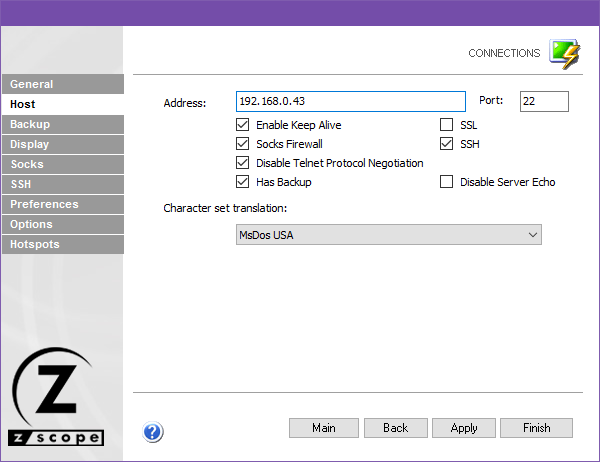
The following table describes the available options.
| Option | Description |
|---|---|
| Address | URL or IP address of the host computer. |
| Port | TCP port defined at the host computer for Telnet access. The default Telnet port number is 23. |
| Enable Keep Alive | Enables keep-alive mechanism, needed for some Telnet servers to prevent disconnections. |
| Socks Firewall | Enables support for Socks firewall. When checked, the Socks tab automatically appears. |
| Disable Telnet Protocol Negotiation | Omits the protocol negotiation when connecting. |
| Has Backup | Enables an alternate IP for this connection. When checked, the Backup tab automatically appears. |
| SSL | Enables SSL (Secure Sockets Layer) for the host. When checked, the SSL tab automatically appears. See Using SSL. SSL and SSH are mutually exclusive. |
| SSH | Enables SSH for the host. When checked, the SSH tab automatically appears. SSH and SSL are mutually exclusive. |
| Disable Server Echo | Prevents the server from echoing every character it receives. |
| Character Set Translation | Character set that best suits your language needs. When BiDi sets are selected, a new option is enabled for BiDi settings. |
See Also
- Configuration Manager - Connections - Unix/VT - General Settings
- Configuration Manager - Connections - Unix/VT - Backup Settings
- Configuration Manager - Connections - Unix/VT - Display Settings
- Configuration Manager - Connections - Unix/VT - Socks Settings
- Configuration Manager - Connections - Unix/VT - SSL Settings
- Configuration Manager - Connections - Unix/VT - SSH Settings
- Configuration Manager - Connections - Unix/VT - Preferences Settings
- Configuration Manager - Connections - Unix/VT - Options Settings
- Configuration Manager - Connections - Unix/VT - HotSpots Settings