
Connection Management
The Connection Management panel allows users with the appropriate permissions to administrate the connections by viewing, deleting and disconnecting its active sessions.
View Modes
The Connection Management panel features two view modes:
By User
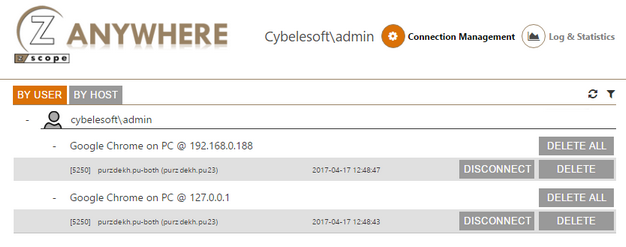
The information on this view mode is grouped first by User, and all the active sessions are organized per Browser and the Source Computer. Each active session includes information regarding the host type, name and address and also the date and time the session was established.
By Host
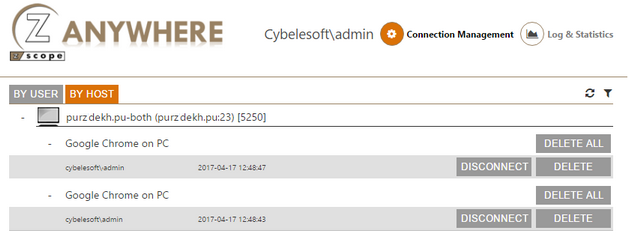
The information on the By Host view mode is grouped by Host and then all the active sessions are organized per Browser and Source Computer. Each active session presented will give you information regarding the application user and also the date and time the session was established.
Managing Sessions
The user assigned to manage connections will be able to disconnect and delete active sessions.
| Icon | Description |
|---|---|
 |
Refresh Refreshes the screen with updated connection data. |
 |
Filters Opens the Filters dialog. |
 |
Disconnect The Disconnect button will disconnect the session from the host. After that, the session screen will be kept open to the user, so that they have the possibility to re-connect again. |
 |
Delete The Delete button will delete the selected session. This means that the session will be disconnected from the host and the user session screen will be closed. If the user is currently viewing this session screen, they will be redirected to the Start page. |
 |
Delete All The Delete All button will perform the same action as the Delete button, but deleting all the existing sessions for a specific host or from a specific user, depending on the view mode (By User/By Host) selected at the moment. |
Filters
The Filters dialog allows you to select only some active sessions, filtering by User and by Host.
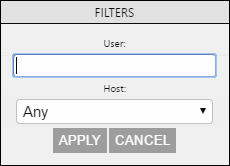
The following table describes the available options.
| Option | Description |
|---|---|
| User | Type in the username or part of it, to restrict the sessions by this criteria. |
| Host | Select one of the listed hosts to have the sessions view restricted by one specific host. |
| Apply | Once you have entered the user or/and selected the host, select Apply and the sessions will be selected using the specified parameters. |