
Backup
In the Backup tab you will see a table showing the list of alternate hosts for the connection. If the connection fails, z/Scope will connect to an alternate host, starting with the first one in the list. If an alternate host fails, z/Scope will connect to the next one in the list.
To configure these settings you will find the following parameters:
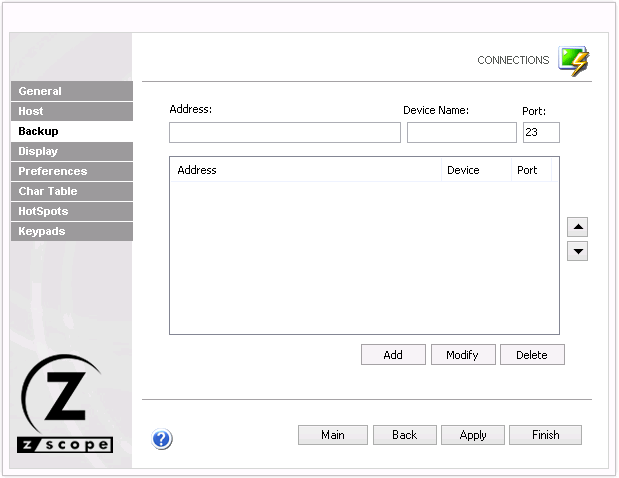
The following table describes the available options.
| Option | Description |
|---|---|
| Address | IP address of the alternate host to add for this connection. |
| Device Name | Device name to use when connecting to the alternate host. |
| Port | Port number for the alternate host. |
| Add | Adds the Address, Device Name, and Port information as a new host at the end of the list. |
| Modify | Replaces the selected host with the information entered in the Address, Device Name, and Port fields. |
| Delete | Removes the selected backup host from the list. |
| Action | Description | |
|---|---|---|
 |
Move Up | Moves the selected backup connection above others in the list. |
 |
Move Down | Moves the selected backup connection below others in the list. |
See Also
- Configuration Manager - Connections - Mainframe/AS400 - General Settings
- Configuration Manager - Connections - Mainframe/AS400 - Host Settings
- Configuration Manager - Connections - Mainframe/AS400 - Display Settings
- Configuration Manager - Connections - Mainframe/AS400 - Printer Settings
- Configuration Manager - Connections - Mainframe/AS400 - Socks Settings
- Configuration Manager - Connections - Mainframe/AS400 - SSL Settings
- Configuration Manager - Connections - Mainframe/AS400 - Preferences Settings
- Configuration Manager - Connections - Mainframe/AS400 - Char Table Settings
- Configuration Manager - Connections - Mainframe/AS400 - HotSpots Settings
- Configuration Manager - Connections - Mainframe/AS400 - Keypads Settings