
Display
In the Display tab you will find the following parameters:
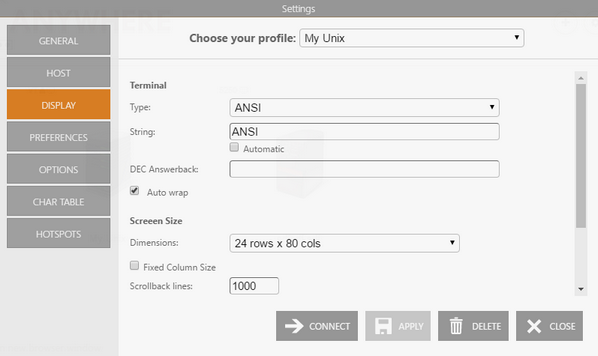
The following table describes the available options.
| Option | Description |
|---|---|
| Type / String | Type of terminal to emulate. Use the String field to inform the server of a different terminal type than the one emulated. Check Automatic to detect the terminal type automatically. |
| DEC Answerback | The DEC Transmit answerback message control character. |
| Auto Wrap | Wraps text lines when the terminal is resized. |
| Dimensions | Number of rows and columns to display. |
| Fixed Column Size | Displays a horizontal scrollbar instead of resizing the font. |
| Scrollback Lines | Number of rows to keep in the buffer for vertical scrollbar access. |
| Mode | Scrolling method to use. |
| Jump Speed | Number of rows to scroll when the scrolling method is set to Jump. |
See Also
- Unix/VT Connections - General Settings (Web Interface)
- Unix/VT Connections - Host Settings (Web Interface)
- Unix/VT Connections - Backup Settings (Web Interface)
- Unix/VT Connections - Socks Settings (Web Interface)
- Unix/VT Connections - SSL Settings (Web Interface)
- Unix/VT Connections - SSH Settings (Web Interface)
- Unix/VT Connections - Preference Settings (Web Interface)
- Unix/VT Connections - Options Settings (Web Interface)
- Unix/VT Connections - Char Table Settings (Web Interface)
- Unix/VT Connections - HotSpots Settings (Web Interface)