
Authentication
In the Authentication tab you will find the following parameters.
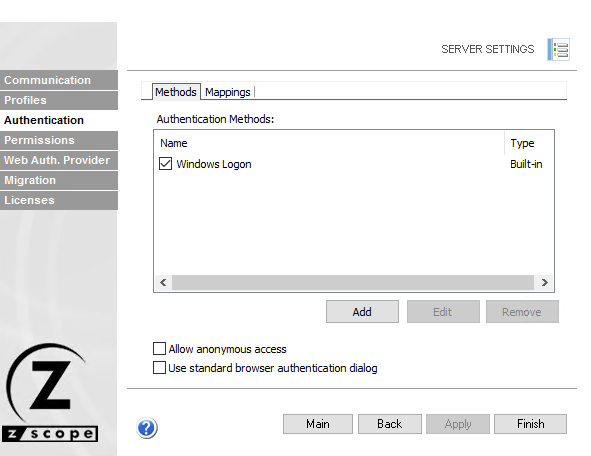
The following table describes the available options.
| Option | Description |
|---|---|
| Authentication Methods | List of available authentication methods. Enable or disable each by checking the box to the left of the name. |
| Name | Name of the authentication method. |
| Type | Authentication method type. |
| Add | Adds a new authentication method. Each method opens a form for the relevant information. |
| Edit | Edits the selected authentication method. |
| Remove | Removes the selected authentication method. |
| Allow Anonymous Access | Allows users to access anonymous access profiles without authentication. |
| Use Standard Browser Authentication Dialog | Uses the standard browser authentication dialog. When unchecked, users authenticate through the z/Scope Anywhere web login. |
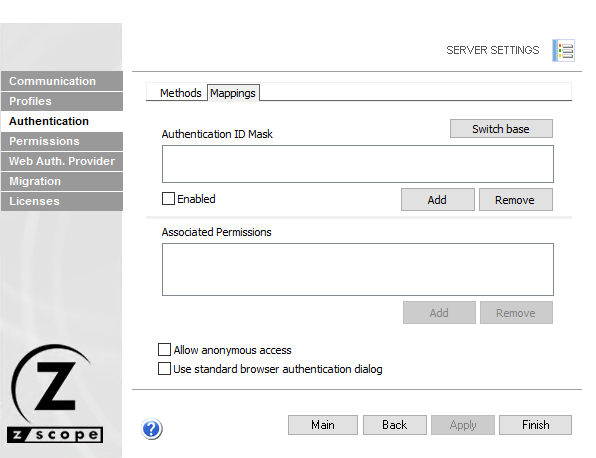
The Mappings tab of the Authentication tab is where you map credentials of methods other than Active Directory so they can be authenticated against the profiles.
| Option | Description |
|---|---|
| Switch Base | Toggles the view between authentication ID masks mapped to AD users/groups, or AD users/groups mapped to authentication IDs. Switching the base does not change users or their mappings. |
| Authentication ID Mask | List of authentication ID masks. Use a full ID or a mask with wildcards (*) to match partial usernames. |
| Associated Permissions | Active Directory users and/or groups associated with authentication ID masks. |
| Enabled | Enables or disables a particular authentication ID mask (only available when the Authentication ID Masks box is shown above). |
| Add (upper box) | Adds a new authentication ID mask or Active Directory user/group. |
| Add (lower box) | Associates an AD user/group or authentication ID mask to the item selected in the upper box. |
| Remove (upper box) | Removes an authentication ID mask or AD user/group and its mappings. Use the Enabled checkbox to disable temporarily instead. |
| Remove (lower box) | Removes the mapping between the selected items. |
See Also
- Configuration Manager - Server Settings - Authentication Settings - Adding a New Authentication Method
- Configuration Manager - Server Settings - Authentication Settings - External DLL
- Authentication API
- Configuration Manager - Server Settings - Communication Settings
- Configuration Manager - Server Settings - Profiles Settings
- Configuration Manager - Server Settings - Permissions Settings
- Configuration Manager - Server Settings - Web Auth Provider Settings
- Configuration Manager - Server Settings - Migration Settings
- Configuration Manager - Server Settings - Licenses Settings