
Start Page
The Start Page provides a convenient and quick access to the Connections and its settings.
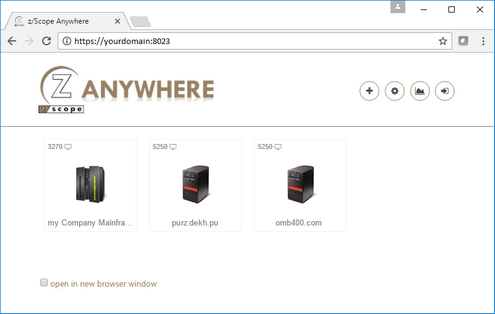
The start page shows the anonymous and authenticated connections available for the anonymous or authenticated user. It also provides access to creating new connections, modifying available connections, analytics data, and logging in.
| Action | Description | |
|---|---|---|
 |
New | The New button allows you to create private connections with personal preferences and communication parameters. Read the topic Creating a Connection from the Web for further information. |
 |
Settings | Through the Settings button you can customize the available connections and configure personal preferences. These modified preferences are stored per user. |
 |
Analytics | The Analytics button gives you access to the Admin Control Panel. Once you select this button, the Control Panel will open in a new browser tab/window. This feature is only enabled for assigned users. |
 |
Log Out/Log in | This button allows you to log out of your current session or to log in to start a session. When you are not logged in, you will only view anonymous connections. |
The start page enables you to:
a) Visualize the configured connections
b) Open new sessions from the existing connections
c) Add new private connections through the New button
d) Customize the existing connections preferences through the Settings button
e) Visualize the logged user in the upper right corner.
Read about the connection buttons you will find in the start page.