
Host
In the Host tab you will find the following parameters:
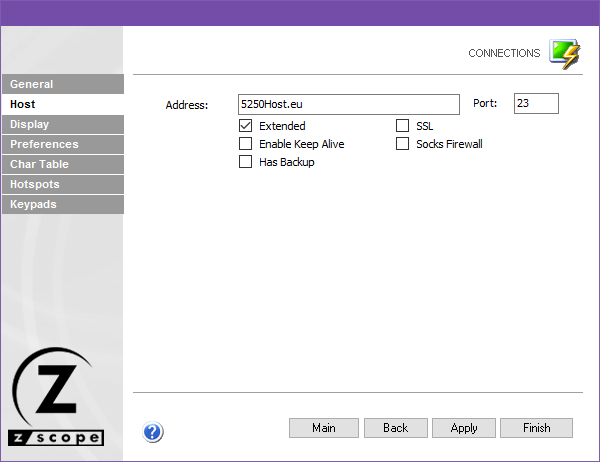
The following table describes the available options.
| Option | Description |
|---|---|
| Address | URL or IP address of the host computer. |
| Port | TCP port defined at the host computer for Telnet access. The default Telnet port number is 23. |
| Extended | Enables Telnet Extended protocols (TN3270E or TN5250E). Enables User Id and Password input boxes for AS/400 connections. |
| Enable Keep Alive | Enables keep-alive mechanism, needed for some Telnet servers. |
| Has Backup | Enables an alternate IP for this connection. When checked, the Backup tab automatically appears. |
| SSL | Enables SSL (Secure Sockets Layer) for the host. When checked, the SSL tab automatically appears. SSL and Gateway options are mutually exclusive. |
| Socks Firewall | Enables support for Socks firewall. When checked, the Socks tab automatically appears. |
| TN5250E Extended Info | Only for TN5250 connections. Provides an enhanced security method defined by the TN5250E norm. |
See Also
- Configuration Manager - Connections - Mainframe/AS400 - General Settings
- Configuration Manager - Connections - Mainframe/AS400 - Backup Settings
- Configuration Manager - Connections - Mainframe/AS400 - Display Settings
- Configuration Manager - Connections - Mainframe/AS400 - Printer Settings
- Configuration Manager - Connections - Mainframe/AS400 - Socks Settings
- Configuration Manager - Connections - Mainframe/AS400 - SSL Settings
- Configuration Manager - Connections - Mainframe/AS400 - Preferences Settings
- Configuration Manager - Connections - Mainframe/AS400 - Char Table Settings
- Configuration Manager - Connections - Mainframe/AS400 - HotSpots Settings
- Configuration Manager - Connections - Mainframe/AS400 - Keypads Settings