
Single Machine Deployment
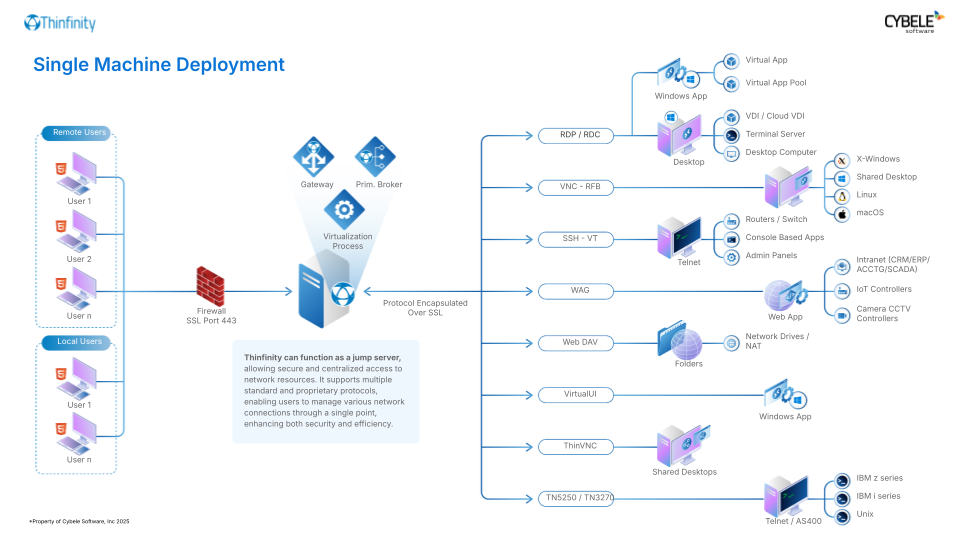
In this setup, all core Thinfinity® Workspace components (Gateway and Primary Broker) are consolidated on a single physical or virtual machine by means of the All-in-one role.
Diagram of the Deployment
Here is a visual representation of the architecture:
- End users access Thinfinity Workspace through a browser or compatible client device.
- The connection is directed to the Gateway installed on the local machine.
- The Primary Broker ensures the session is managed and resources are allocated properly.
- Resources are served directly from the same machine.
Explore the Interactive Demo for More Details
Become familiar with Thinfinity Workspace capabilities by starting with this basic architecture and evaluate if it fits your needs before scaling to more advanced configurations.
Info
For detailed, step-by-step instructions on configuring an All-in-one deployment on a single machine, refer to Installing a Testing/Evaluation Set-Up - All-in-one.
Use Cases
This setup is best suited for:
- Testing and evaluating Thinfinity Workspace in a controlled environment.
- Small-scale deployments with a limited number of users.
- Training or demo scenarios where simplicity and quick setup are prioritized.