
Folders Tab
The Folders tab in Thinfinity Configuration Manager allows you to share a folder on your Thinfinity® Workspace with another user or a group, maintaining security by using credentials to authenticate clients.
Thinfinity Workspace maps the temporary shared folders automatically as a disk directory. This connection will be available and accessible while the admin session is active. When the session ends, the connection to the folders and all the files inside will finish until the admin goes online again.
The following options are available in the Folders tab.
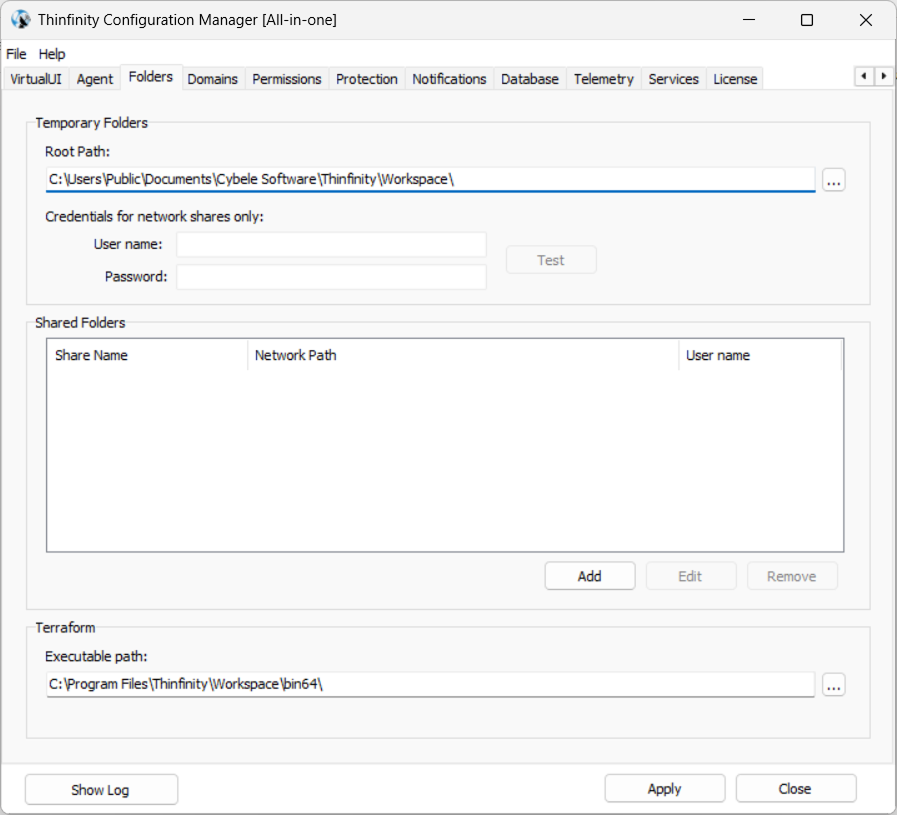
| Option | Description |
|---|---|
| Temporary Folders Root Path | Temporary folders are used to keep temporary files such as printed documents, files uploaded to or downloaded from the remote machine, files copied into the mapped intermediate disks, or recorded sessions. Note: You may need to move the temporary folders to another disk location in case you have intensive file exchange or also if users start using the intermediate disks as their storage folder. |
| Credentials for network shares only | Use Windows credentials to authenticate to the network temporary folder. Check those credentials with the Test button. |
| Shared Folders | A Shared Folder is a directory that will be set as one mapped disk inside the remote desktop connection. They are accessible by all Thinfinity Workspace users/profiles as a disk in the remote connection and also as a file transfer location. |
| Network User | Sets a valid Windows Active Directory user for accessing the shared folders being published. |
| Add/Edit/Remove | Use these buttons to add, edit or remove shared folders. |
| Terraform Executable Path | Enter the path to the location where the Terraform executable is stored. See Terraform Templates in the Cloud Manager Manual for details on why this setting is necessary. |
The following parameters are available when defining/editing a shared folder.
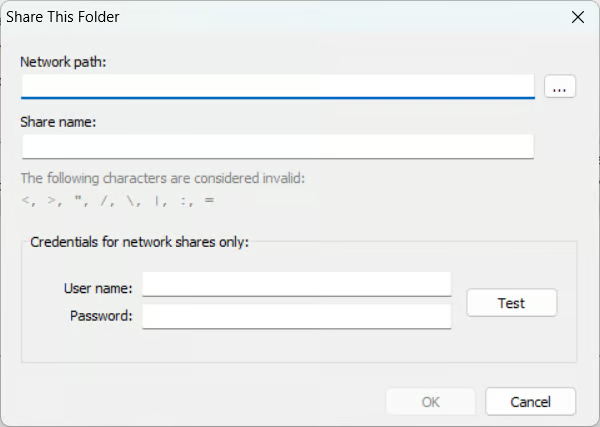
| Option | Description |
|---|---|
| Network path | Select the folder to be shared with the users. |
| Share name | Set a name for the new shared folder. |
| Credentials for network shares only | Use Windows credentials to authenticate to the network temporary folder. Check those credentials with the Test button. |
On machines running Thinfinity Workspace with the Agent role — either the Workspace Agent or the VirtualUI Agent — the Configuration Manager also exposes the Folders tab. On an Agent, it lets administrators redirect the machine’s Temporary Folder to a network share — for example, to centralize session recordings from Agent-hosted sessions alongside those produced by primary and secondary brokers. Note that on an Agent only the Temporary Folders settings are available — the Shared Folders and Terraform sections apply to broker roles and are not shown.