
Gateway Tab
The Gateway tab appears in the Configuration Manager when the role for this Thinfinity® Workspace installation is set to Gateway (see Services Tab). It exposes the settings that differentiate a communications gateway from a primary gateway: the Primary Gateway URLs the local instance is associated with, whether the local instance operates as a communications gateway, and — when it does — the addresses that are allowed to reach it without an authorized browser session.
For the concept and the broader end-to-end setup, see Gateway and Registering Communications Gateway URLs.
To access these settings, navigate to Configuration Manager > Gateway.
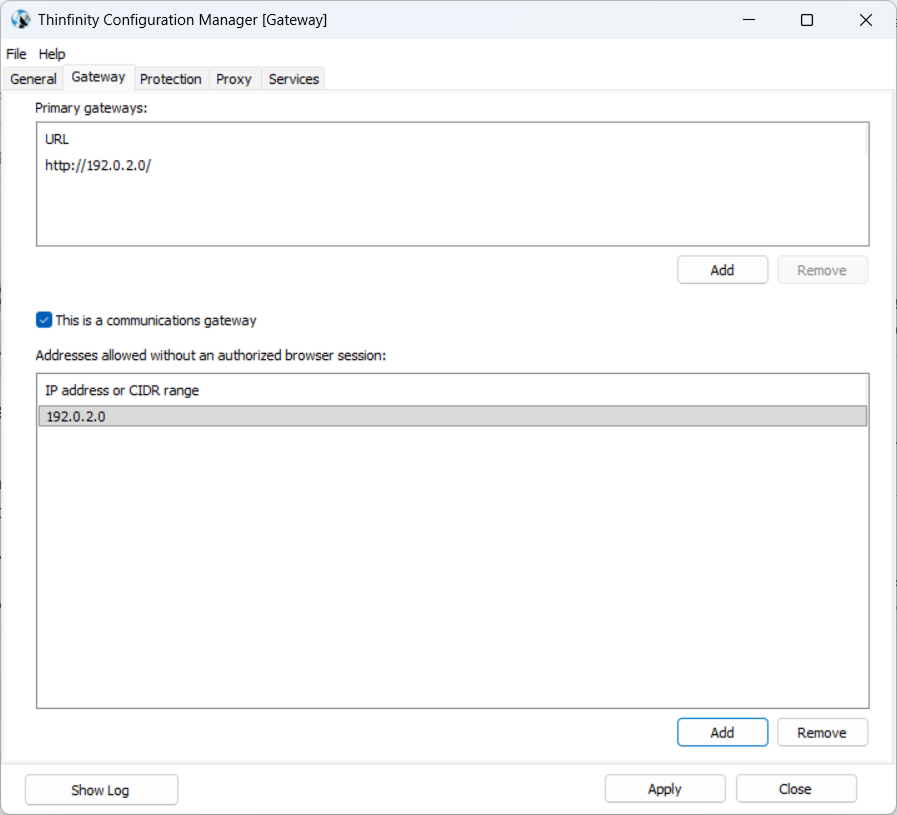
The following options are available:
| Option | Description |
|---|---|
| Primary gateways | The list of Primary Gateway URLs the local instance is associated with. Each entry is a full URL (https://<host>[:<port>]); use Add to register a URL and Remove to drop the selected one. Meaningful when This is a communications gateway is on — the list names the Primary Gateway(s) the local Communications Gateway coordinates with. On a primary Gateway (checkbox off), the list is typically empty. |
| This is a communications gateway | Declares the local gateway as a communications gateway — the dedicated address the Desktop Client uses for its direct connection when the primary Gateway sits behind a load balancer. When on, the Broker treats this instance as a communications gateway and hands its address out to the Desktop Client accordingly; when off (default), the instance operates as a primary gateway. See Communications Gateway for the role and Registering Communications Gateway URLs for the settings.ini and JSON alternatives. |
| Addresses allowed without an authorized browser session | List of IPv4 addresses, each with an optional CIDR prefix (A.B.C.D or A.B.C.D/N with N in 0–32), that bypass the browser-authorization check on this Communications Gateway. Requests from IPs in any of the listed ranges are forwarded even without a valid browser-auth grant. Only visible when “This is a communications gateway” is on. IPv4-only by design: hostnames and IPv6 are rejected. Use Add to enter a new range and Remove to drop the selected one. Leave the list empty on gateways that should only accept authorized browser sessions. |
The underlying storage for these settings is in the [Gateway.Lockdown] section of settings.ini on the local gateway — IsCommGateway for the checkbox and AllowIpList (semicolon-separated) for the IP list — and the Broker’s [Broker] section for the primary Gateway address itself (DefaultCommGatewayURL, CommGatewayURL_N). Both surfaces edit the same effective configuration; use whichever fits the workflow.