
Directory Services Tab
The Directory Services tab allows defining the user databases that the system will use to validate credentials and look up permissions. While the Mappings tab handles the relationship between external and local IDs, the Directory Services tab defines the source of those local IDs.
This tab is essential for establishing the “Source of Truth” for user identities within your environment:
- Define Identity Sources: Administrators use this tab to specify which Directory Services (such as Windows Local Users, Active Directory, or Azure AD) are available to the system.
- Credential Validation: When a user logs in, Thinfinity queries the services defined here to verify that the username and password (or token) are valid.
To access Directory Services configuration settings, navigate to Configuration Manager>Authentication>Directory Services.
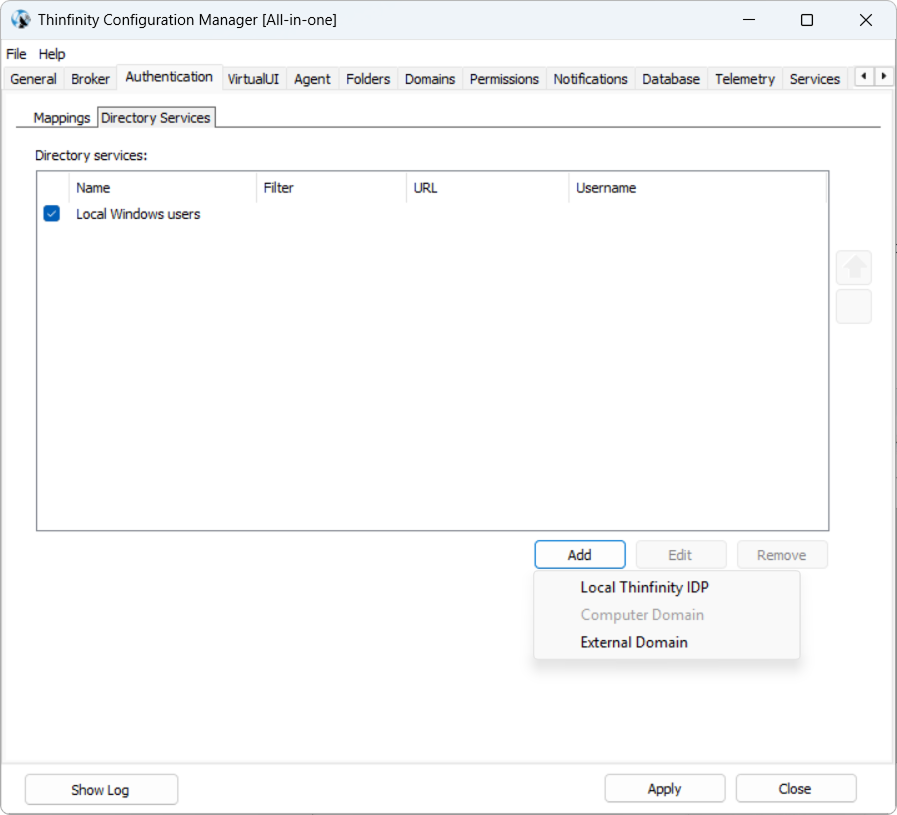
The following options are available.
| Options | Details |
|---|---|
| Directory Services | List of existing directory services connected to the current Thinfinity Workspace installation and their respective parameters. |
| Add/Edit/Remove | Use these buttons to manage the directory services. Local computer users - The default Directory Service supported by Thinfinity Workspace is Windows logon/Local Windows users.Allows adding and managing local accounts from the host machine. This option is useful in smaller environments where user accounts are handled directly on the host computer rather than a domain. Local Thinfinity IdP - Allows Thinfinity® Workspace to act as its own identity provider. Typically used for environments that prefer to manage authentication internally within Thinfinity, without relying on external IdPs or domains. For details on how to configure this functionality, see Members. External Domain - Allows incorporating users from an external domain, providing access to users from other organizations or networks. Useful in multi-domain or federated environments where collaboration across domains is required. Note: at least one Directory Service has to remain active. |
| Move up/Move down | The buttons to the right of the Directory Services list activate only after adding at least two Directory Services. These buttons enable the admin to set the processing order. |