
AD Cache Tab
The AD Cache tab is only available when Thinfinity Workspace is running on a machine that is a member of an Active Directory domain.
AD Cache is a service that creates a unified external Active Directory domain across multiple nodes. It optimizes system performance and administrative management by maintaining domain data exclusively within volatile memory.
AD Cache enhances security with granular access control by allowing the creation of an authorized list of users and groups. This implementation restricts domain access to verified individuals. By storing access control data in the cache memory, authentication and authorization operations are executed with minimal latency.
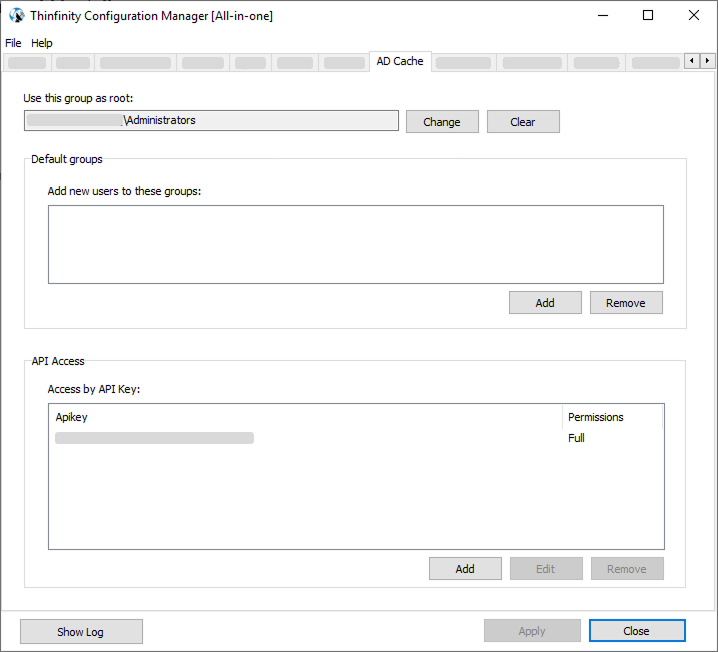
| Option | Description |
|---|---|
| Use this group as root | Limits the scope of which users and groups Thinfinity Workspace synchronizes and searches in your organization’s Active Directory (only the members of this group, recursively, are cached). It also acts as the default group when a user or group created from Workspace specifies no other. |
| Add new users to these groups | The Active Directory groups that every user created from Thinfinity Workspace (through the Members section of the Web Manager, or the AD Cache API) is added to. This writes the groups’ membership in Active Directory, so the service account needs Write Members on each listed group — see AD Cache — Service Account and Required Permissions. It does not affect existing, synchronized users. |
| Access by API Key | This API Key will be autogenerated individually and acts as a unique domain identifier. Important: To ensure all your nodes are recognized as part of the same external AD, you must manually copy this exact key to every other AD Cache service in your network. Nodes with a matching key will function as members of the same domain. For details on the multi-node architecture, see Understanding AD Cache (RemoteAD). |
The service account and the trusted-domain credentials that the AD Cache uses are entered on the Domains Tab. For the Active Directory rights the account requires and how to delegate them, see AD Cache — Service Account and Required Permissions.