
Telemetry Tab
Thinfinity® Workspace uses the OpenTelemetry standard to collect, process, and export observability signals. These are then used by the Monitoring add-on to display real-time and historical metrics about the current Thinfinity Workspace installation.
For details on the Monitoring add-on, see Monitoring. To set up metrics collection across multiple Brokers, see Configuring Monitoring in a Distributed Environment.
HTTPS bindings and certificate validation: The OpenTelemetry collector retrieves its settings over the Gateway binding. When that binding uses HTTPS, its certificate is validated, so the Gateway must be reachable through a host name the certificate is valid for — the address cannot be blank or an IP address.
Set Host name on the HTTPS binding (General tab, Binding dialog) to a value the selected certificate covers. If a certificate-valid host name is not available, use an HTTP binding instead; otherwise certificate validation fails and the collector cannot load its configuration.
The Telemetry tab allows customizing the connections to the OTLP Gateway and Metrics database. This tab presents the default configurations for the Telemetry feature.
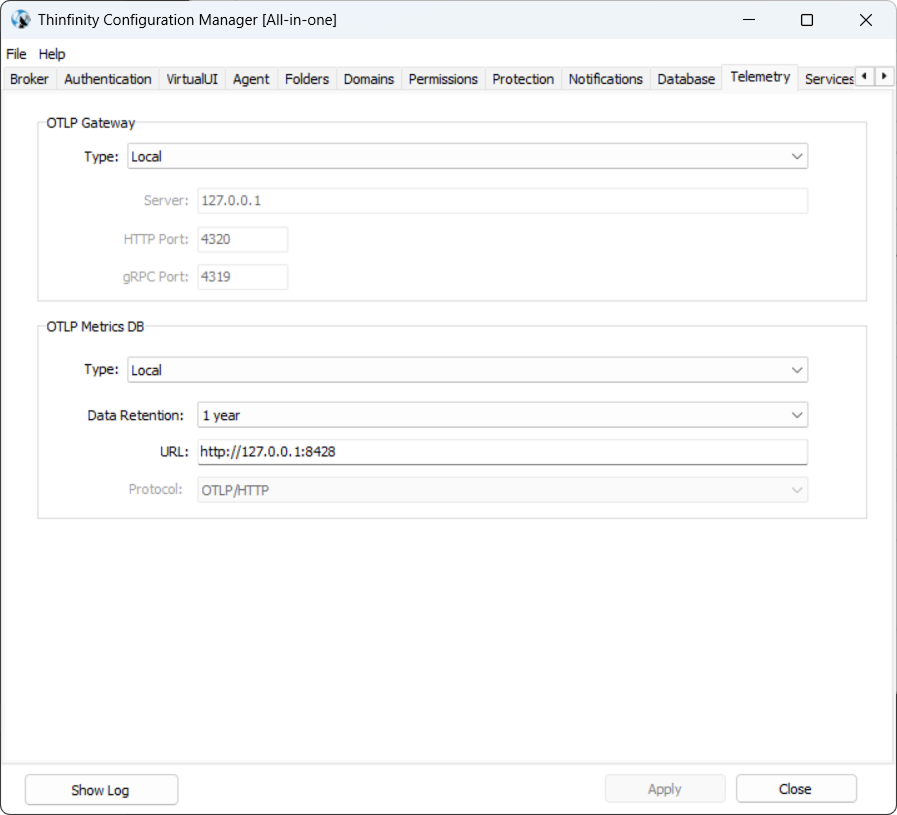
The following options are available.
OTLP Gateway
By default (Type = Local), the OTLP Gateway runs as a local collector, and the Server, HTTP Port, and gRPC Port fields show their default values and are read-only. Set Type to Remote to point the collector at an external gateway and enter its connection details.
| Field | Description |
|---|---|
| Type | Gateway location. Local (the default) runs the collector on this host; Remote enables the fields below so you can point to an external gateway. |
| Server | Gateway IP address. Defaults to 127.0.0.1. |
| HTTP Port | Default value, 4320. Modify if applicable. |
| gRPC Port | Default value, 4319. Modify if applicable. |
OTLP Metrics DB
The metrics backend integrated within Thinfinity Workspace uses VictoriaMetrics as its default time-series database. It runs locally on the host by default, but can be reconfigured to run on an external host or to forward to another OTLP-compatible backend. The following parameters are available.
| Field | Description |
|---|---|
| Type | Where metrics are stored. Local (the default) keeps them in this host’s embedded VictoriaMetrics instance; Remote forwards them to another host’s instance. |
| Data Retention | How long metrics are kept. Defaults to one year. Disabled when Type is Remote, since retention is then handled by the remote backend. |
| URL | The metrics backend address. Defaults to http://127.0.0.1:8428; set it to the remote backend’s URL when Type is Remote. |
| Protocol | The transport protocol. Read-only and set to OTLP/HTTP when Type is Local; selectable when Type is Remote. |