
Protection Tab
See also
These settings are also configurable from the Web Manager. See Threat Prevention.
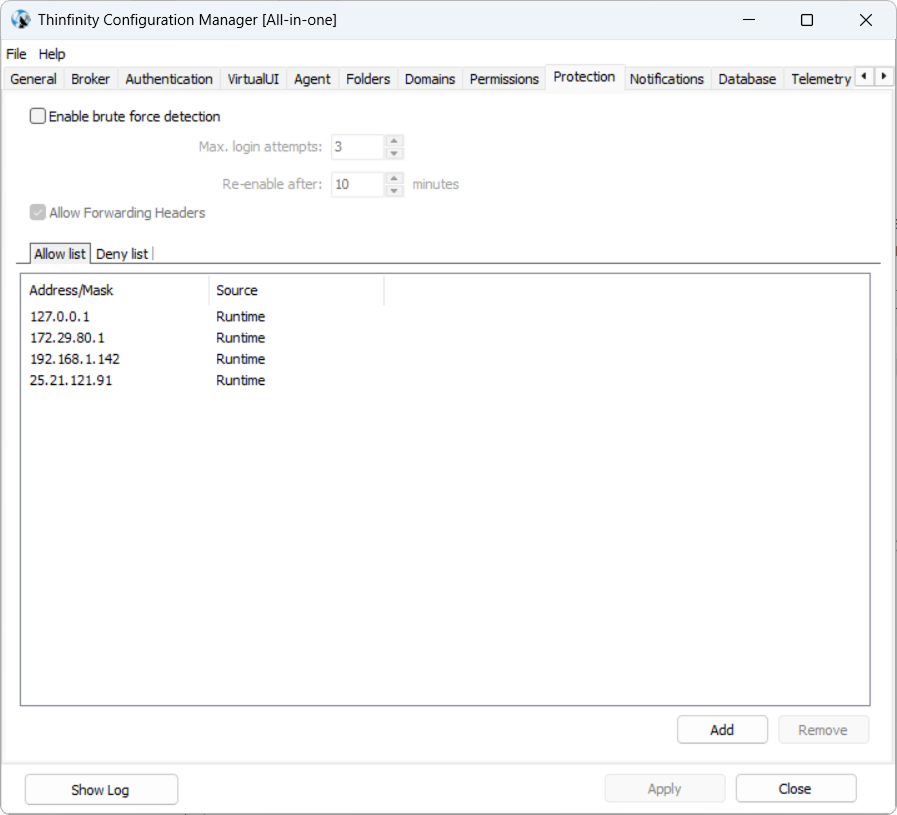
The Protection tab allows managing security-related configurations and setting up protections that ensure secure access and usage of the Thinfinity® Workspace environment.
| Option | Description |
|---|---|
| Enable brute force detection | Helps protect against brute force attacks, where attackers attempt to gain access by guessing passwords through repeated login attempts. Selecting this option will enable the associated fields, Max. login attempts and Re-enable after. |
| Allow Forwarding Headers | Enables or disables the use of forwarding headers (such as X-Forwarded-For) to track the original IP address of a client when requests pass through a proxy or load balancer. |
| Allow list | Allows administrators to specify trusted IP addresses or ranges that are explicitly permitted access to Thinfinity Workspace. |
| Deny list | Allows administrators to block specific IP addresses or ranges from accessing Thinfinity Workspace. |