
Services Tab
The Services tab allows administrators to select the role of the current Thinfinity® Workspace installation and enable or disable the associated core services that facilitate the functionality of the platform.
For the All-in-one role, the Services tab is presented as in the following image.
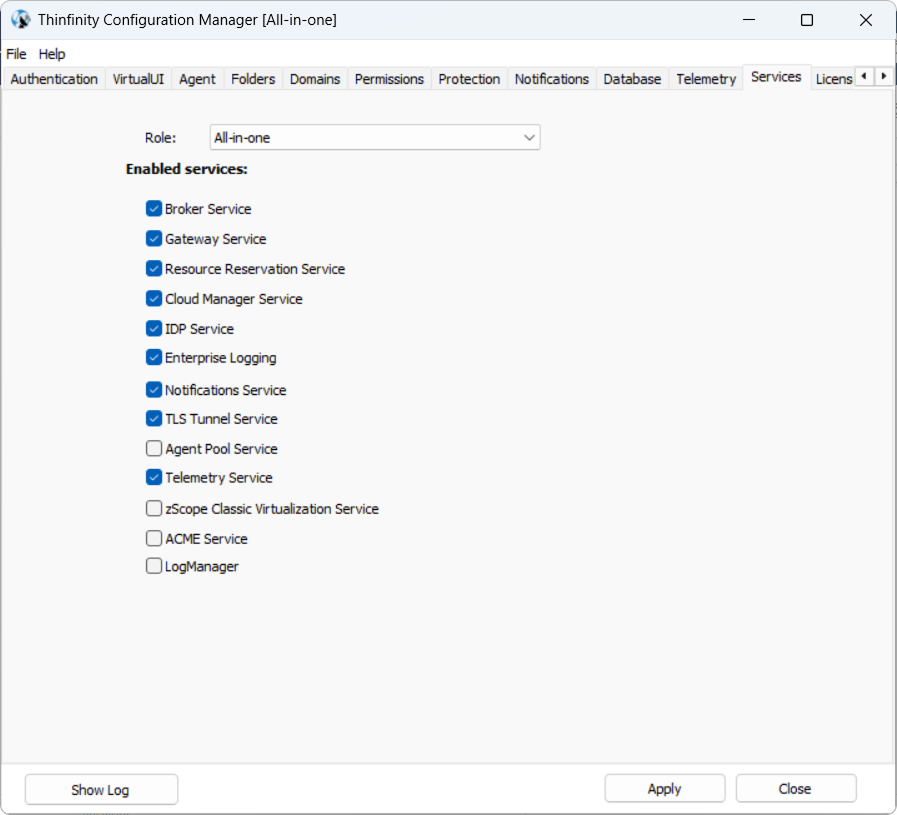
The Role field selects the role for the current installation. Choosing a role does not install or remove any component — every role’s components are already present on the machine; the selection only enables the services that role needs and disables the rest.
| Role | Description |
|---|---|
| All-in-one | Runs the Gateway and Broker services on the same machine. See Installing a Testing/Evaluation Setup - All-in-One. |
| Gateway | Handles external connections only. See Configuring Thinfinity Gateway. |
| Primary Broker | Manages user sessions and resources as the primary broker of the pool. See Configuring Thinfinity Primary Broker. |
| Secondary Broker | Adds broker redundancy to the pool. See Configuring Thinfinity Secondary Broker. |
| AD Cache | Synchronizes and caches Active Directory data for authentication. Only offered when the machine is joined to an Active Directory domain. See Understanding AD Cache. |
The Role dropdown only lists the roles that apply to how this machine was set up:
- All-in-one, Gateway, Primary Broker, and Secondary Broker come from the main Thinfinity Workspace installer, which installs the Gateway and Broker components together — so these four roles are always available as a set.
- AD Cache is also part of the main installer, but only appears as a role when the machine is joined to an Active Directory domain. Outside a domain the role is hidden — see AD Cache Tab.
The Agent and VirtualUI Agent roles are not selected here: they are assigned automatically when the machine is set up with the separate Agent package (the role picker is not shown in that case). See Configuring Thinfinity Agent for Workspace and Configuring Thinfinity Agent for VirtualUI.
By default, all services are enabled except for the Agent Pool, zScope Classic Virtualization, and ACME Service, which can be enabled at any time if required.
| Service | Description |
|---|---|
| Broker Service | Manages user sessions and distributes resources, ensuring users are properly connected to their virtual desktops or applications. See Brokers for more information about this component. |
| Gateway Service | Handles external connections to the system, allowing users to access virtual desktops or apps from remote locations. See Gateways for more information about this component. |
| Resource Reservation Service | Manages the reservation of end resources such as VMs, desktops, etc. See Resource Reservation for more details about this feature. |
| Cloud Manager Service | Controls the provisioning and management of virtual machines across cloud environments. Visit the Cloud Manager manual for more information about this feature. |
| IDP Service | Manages identity and access management through Thinfinity IdP. |
| Enterprise Logging | Provides detailed logging of system events, user activities, and security actions. In conjunction with the Telemetry feature provides data for the Analytics, Monitoring, and Audit add-ons. |
| Notifications Service | Manages system notifications related to user activities and Resource Reservation. |
| TLS Tunnel Service | Manages the TLS Tunnel encryption, used exclusively by the Thinfinity Workspace Desktop Client. |
| Agent Pool Service | Allows connecting a Virtualization Agent (or a pool of agents) with the rest of the defined network (Thinfinity Workspace Gateway, Primary and/or Secondary Broker(s)). |
| Telemetry Service | Enables or Disables Telemetry tab configuration for metrics and logs storage. |
| zScope Classic Virtualization Service | Supports legacy virtualization technologies and terminal protocols, ensuring backward compatibility with older systems. |
| ACME Service | Has to be enabled when using Thinfinity Workspace to create ACME certificates with services. |