
Connection Metrics
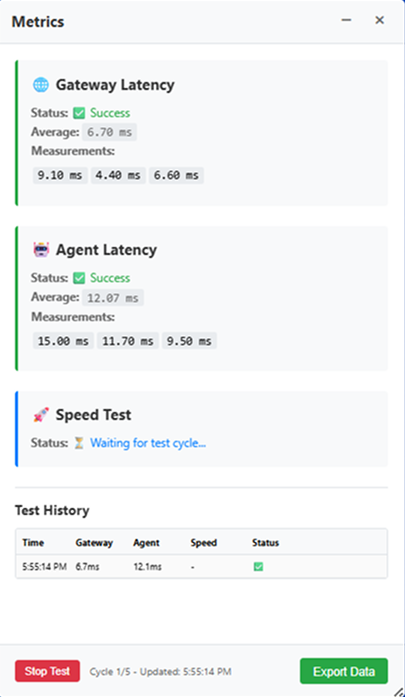
Connection Status, in the Miscellaneous group of the connection toolbar, opens the Metrics panel. The panel measures the latency of each hop between the client device and the remote resource and tests available throughput, giving an administrator or user a reading of connection quality from the client’s own perspective. The panel can be minimized or closed without ending the session.
Connection Status can be pinned to the connection toolbar for every session, rather than left in the Toolbar panel, through the advanced settings files.
For the advanced settings files, see Overriding Connection Configurations.
Metrics Cards
| Card | Description |
|---|---|
| Gateway Latency | Round-trip latency to the Thinfinity Gateway, reported as a status, an average, and the individual measurements from the current cycle. |
| Agent Latency | Round-trip latency to the Virtualization Agent serving the session, reported in the same form. |
| Speed Test | Throughput measurement, reporting the volume transferred, the duration, and the resulting speed. |
While a test is running, a card that has not yet produced a result reports that it is waiting for the test cycle.
Running a Test
Start Test begins a test run and Stop Test ends it early. While a run is in progress the panel reports the current cycle, the total number of cycles, and the time of the last update; on completion it reports the number of cycles completed.
Test History
The Test History table lists completed measurements with the time of each, the gateway and agent latencies, the speed where a throughput test ran in that cycle, and the status.
Each Start Test begins a fresh history: the previous run’s measurements are cleared when a new run starts. Within a run the table accumulates one row per cycle, newest first (up to the 50 most recent). The history is held only while the panel is open and is not stored between sessions — use Export Data to keep a run’s results.
Exporting Results
Export Data opens the Export Test Data dialog, which offers two formats.
| Option | Description |
|---|---|
| CSV Format | A spreadsheet-friendly format, selected by default. |
| JSON Format | The complete data structure, including all measurements and their metadata. |
Export writes the file; Cancel closes the dialog without exporting.
The exported file contains every completed measurement listed in Test History, with a Timestamp column, per-metric latency (or throughput) columns, a status column for each measurement, and an overall status. Files are named metrics-export-YYYY-MM-DDTHH-MM-SS.csv or .json, stamped at the moment of export.