
API Access Settings
To access API access configuration settings: in the main Thinfinity® Workspace page, select the user profile to access the user menu and select Settings. Next, navigate to Configuration>Authentication>Authentication Methods, select Add and choose API Access.
The following options are available for the API access method:
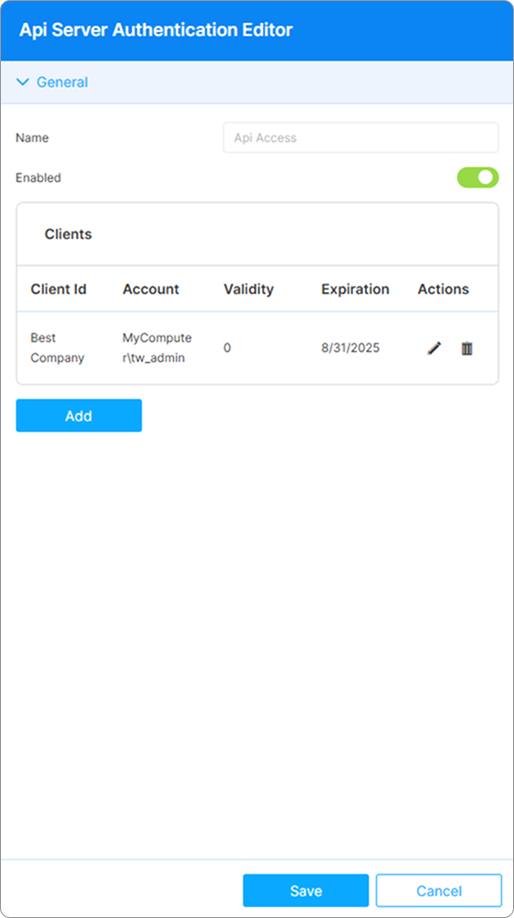
| Option | Description |
|---|---|
| Name | The name is assigned by default for easy identification within the system, it cannot be edited. |
| Enabled | This option is selected by default when adding the authentication method. |
| Add/Edit/Remove | Use these buttons to add, configure or remove client API access definitions. |
To access the parameters of an API Client, select Add or Edit.
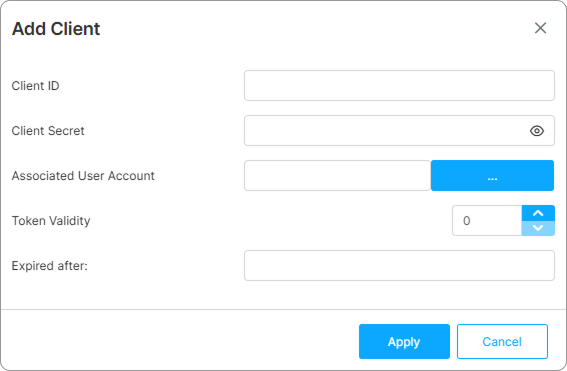
| Option | Description |
|---|---|
| Client ID | The ID of the client using the current API user to connect to the platform. |
| Client Secret | The Client Secret. |
| Associated User Account | The Thinfinity Workspace user account to which the current API user is linked. |
| Token Validity | The token validity interval. |
| Expires after | Expiration date of the Token. |