
Configuring Thinfinity Agent for Workspace
In Thinfinity Workspace, agent deployment requires a separate installation package, as it is not included within the main software bundle. The agent can be installed in two modes: as a Workspace agent or as a VirtualUI agent. In this article we describe the configuration of the Workspace agent.
Installing this package sets the machine’s installation role to Agent automatically — it is not a role you pick from the Role dropdown of the Services Tab, which only lists the roles of the main Workspace installer.
Upon completion of the installation wizard and successful agent deployment, the following configuration must be performed.
Set the Network ID Parameter
In the General tab, go to the Network section and enter the same Network ID you used before in the Gateway Configuration.
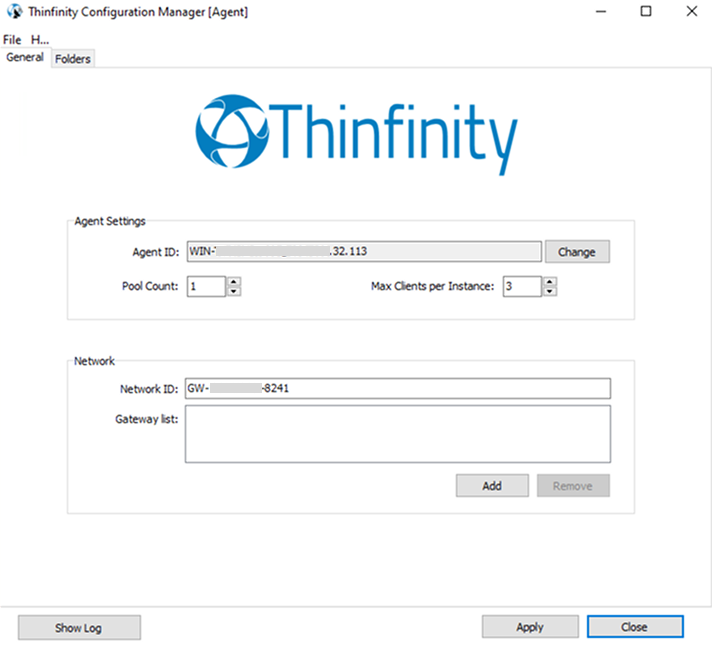
Commit Changes
Submit changes by selecting Apply.
The Agent ID identifier uniquely corresponds to the host machine (where the agent is deployed). Thinfinity Workspace automatically generates a randomized alphanumeric ID, which can be manually modified to a custom alphanumeric string if desired.
The Configuration Manager on the Agent exposes a Folders tab, which can be used to redirect the machine’s Temporary Folder to a network share — for example, to centralize session recordings from Agent-hosted sessions alongside those produced by primary and secondary brokers. For the full list of file types stored in the Temporary Folder and the remaining Temporary Folder options, see Folders Tab.