
Add-ons
Important
Except for Resource Reservation, add-ons are only available if enabled for a user or for a group of users.
For details on how to enable a feature, see User Interface Permissions and Permissions Tab.
Add-ons provide additional functionality to Thinfinity® Workspace and enhance its usability.
To access the Add-ons, select the user profile icon at the top right of your home page: the user menu is displayed as in the following image.
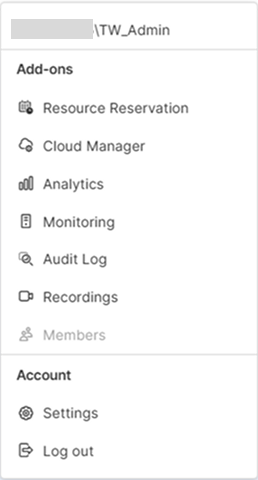
| Options | Description |
|---|---|
| Resource Reservation | Depending on the user role (permissions), allows creating a resource reservation request and/or managing resource reservation requests. For details on user roles and permissions, see Working with Resource Reservations. |
| Cloud Manager | Allows managing the remote connections and resources across multiple servers and Cloud Providers. |
| Analytics | Tracks connection history, including the duration of each connection, the number of users connected, the sources used, and much more. |
| Monitoring | Offers comprehensive monitoring and diagnostic tools for the components of the deployment. |
| Audit Log | Keeps a detailed record of all activity that occurs on the remote desktop servers, providing a valuable source of information for security and compliance purposes. |
| Recordings | Allows reviewing recordings of remote desktop sessions, providing a valuable tool for training, troubleshooting, and security. |
| Members | When working with Thinfinity IdP feature, allows administrators to create or manage users or groups of users and their permissions. |