
RADIUS MFA Settings
To access RADIUS MFA configuration settings: in the main Thinfinity® Workspace page, select the user profile to access the user menu and select Settings. Next, navigate to Configuration>Authentication>Two-Factor Authentication, then select Add and choose RADIUS MFA.
The following configuration parameters are available for RADIUS MFA.
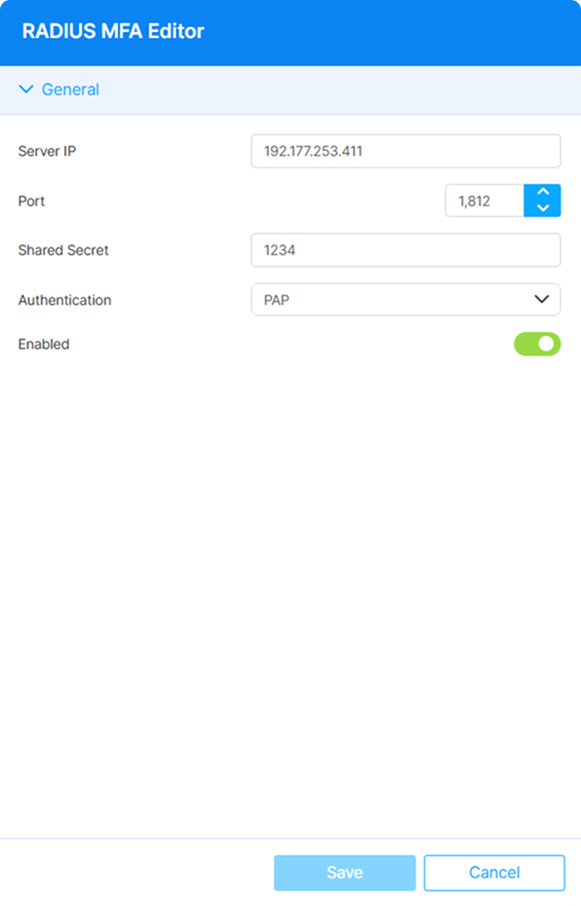
The following options are available:
| Option | Description |
|---|---|
| Server IP | IP address or hostname of the RADIUS server. |
| Port | UDP port for RADIUS authentication. |
| Shared secret | The secret key shared between Thinfinity Workspace and the RADIUS server. Must match the NAS client entry on the RADIUS server exactly. |
| Authentication | The authentication protocol used for the RADIUS exchange. Select one of the supported protocols from the drop-down (see Authentication Protocols below). |
| Enabled | Enabled by default when the method is added. Disable to keep the method configured without applying it to any Authentication Method. |
Authentication Protocols
The Authentication field determines the protocol used to transmit and verify user credentials between Thinfinity Workspace and the RADIUS server. Select the protocol that matches your RADIUS server configuration:
| Option | Description |
|---|---|
| PAP | Password Authentication Protocol — transmits credentials in plain text (encrypted within the RADIUS shared-secret envelope). The simplest and most widely compatible option. |
| CHAP | Challenge-Handshake Authentication Protocol — uses a three-way handshake with a challenge/response mechanism to avoid transmitting the password directly. |
| MSCHAP | Microsoft CHAP — a Microsoft implementation of CHAP that uses NT password hashes, commonly used in Windows-centric environments. |
| MSCHAPv2 | Microsoft CHAP version 2 — an improved version of MSCHAP with mutual authentication and stronger cryptographic keys. Recommended for most Windows/AD environments. |
| EAP | Extensible Authentication Protocol — a flexible framework supporting multiple authentication methods (e.g., EAP-TLS, EAP-PEAP). Use this when your RADIUS server requires certificate-based or extensible authentication. |